<?xml version="1.0" encoding="utf-8"?><feed xmlns="http://www.w3.org/2005/Atom" ><generator uri="https://jekyllrb.com/" version="4.3.3">Jekyll</generator><link href="https://ntsd.dev/feed.xml" rel="self" type="application/atom+xml" /><link href="https://ntsd.dev/" rel="alternate" type="text/html" /><updated>2025-01-27T09:58:15+07:00</updated><id>https://ntsd.dev/feed.xml</id><title type="html">Jirawat Boonkumnerd</title><subtitle>A software engineer who loves coding.</subtitle><entry><title type="html">How to use Stream Pipe and Transform in Node.js</title><link href="https://ntsd.dev/node-stream-pipe-and-transform/" rel="alternate" type="text/html" title="How to use Stream Pipe and Transform in Node.js" /><published>2024-11-23T00:00:00+07:00</published><updated>2024-11-23T00:00:00+07:00</updated><id>https://ntsd.dev/node-stream-pipe-and-transform</id><content type="html" xml:base="https://ntsd.dev/node-stream-pipe-and-transform/"><![CDATA[<p>If you want to perform data streaming in Node.js,</p>
<p>for example, to replace all strings using a global RegEx,</p>
<p>reading the entire data and processing it at once will use more memory than processing the data in chunks or partially.</p>
<p>The code below shows you how to replace the string <code>/Lorem\sipsum/g</code> with <code>muspi meroL</code>.</p>
<p>However, the issue is that it will load the data all at once into memory, then process the replacement, and finally save the replaced data to a new file.</p>
<div class="language-js highlighter-rouge"><div class="highlight"><pre class="highlight"><code><span class="k">import</span> <span class="nx">fs</span> <span class="k">from</span> <span class="dl">"</span><span class="s2">fs</span><span class="dl">"</span><span class="p">;</span>

<span class="kd">const</span> <span class="nx">reader</span> <span class="o">=</span> <span class="nx">fs</span><span class="p">.</span><span class="nx">readFileSync</span><span class="p">(</span><span class="dl">"</span><span class="s2">./test.txt</span><span class="dl">"</span><span class="p">);</span> <span class="c1">// 190MB lorem ipsum text</span>
<span class="kd">const</span> <span class="nx">replaced</span> <span class="o">=</span> <span class="nx">reader</span><span class="p">.</span><span class="nx">toString</span><span class="p">().</span><span class="nx">replace</span><span class="p">(</span><span class="sr">/Lorem</span><span class="se">\s</span><span class="sr">ipsum/g</span><span class="p">,</span> <span class="dl">"</span><span class="s2">muspi meroL</span><span class="dl">"</span><span class="p">);</span>

<span class="nx">fs</span><span class="p">.</span><span class="nx">writeFileSync</span><span class="p">(</span><span class="dl">"</span><span class="s2">./test.out.txt</span><span class="dl">"</span><span class="p">,</span> <span class="nx">replaced</span><span class="p">);</span>
</code></pre></div></div>
<p>By print the memory use by <code>process.memoryUsage()</code> you can see that it use a lot of memory.</p>
<div class="language-text highlighter-rouge"><div class="highlight"><pre class="highlight"><code>Memory usage by rss, 884.441088MB
Memory usage by heapTotal, 585.957376MB
Memory usage by heapUsed, 549.476792MB
Memory usage by external, 198.597365MB
Memory usage by arrayBuffers, 196.189773MB
✨  Done in 1.34s.
</code></pre></div></div>
<p>In case you want to process a very big file or have limited memory,</p>
<p>you can process the data using <a href="https://nodejs.org/api/stream.html">Node.js stream</a>,</p>
<p>which means the data will be processed in parts and then passed through another process.</p>
<p>For example,</p>
<div class="language-js highlighter-rouge"><div class="highlight"><pre class="highlight"><code><span class="k">import</span> <span class="p">{</span> <span class="nx">Transform</span> <span class="p">}</span> <span class="k">from</span> <span class="dl">"</span><span class="s2">stream</span><span class="dl">"</span><span class="p">;</span>
<span class="k">import</span> <span class="nx">fs</span> <span class="k">from</span> <span class="dl">"</span><span class="s2">fs</span><span class="dl">"</span><span class="p">;</span>
<span class="k">import</span> <span class="nx">split2</span> <span class="k">from</span> <span class="dl">"</span><span class="s2">split2</span><span class="dl">"</span><span class="p">;</span>

<span class="kd">class</span> <span class="nx">ReplaceTransformSplit2</span> <span class="kd">extends</span> <span class="nx">Transform</span> <span class="p">{</span>
  <span class="nl">regex</span><span class="p">:</span> <span class="nx">string</span> <span class="o">|</span> <span class="nb">RegExp</span><span class="p">;</span>
  <span class="nl">replacer</span><span class="p">:</span> <span class="nx">string</span> <span class="o">|</span> <span class="p">((</span><span class="nx">substring</span><span class="p">:</span> <span class="nx">string</span><span class="p">,</span> <span class="p">...</span><span class="nx">args</span><span class="p">:</span> <span class="nx">unknown</span><span class="p">[])</span> <span class="o">=&gt;</span> <span class="nx">string</span><span class="p">);</span>

  <span class="kd">constructor</span><span class="p">(</span>
    <span class="nx">regex</span><span class="p">:</span> <span class="nx">string</span> <span class="o">|</span> <span class="nb">RegExp</span><span class="p">,</span>
    <span class="nx">replacer</span><span class="p">:</span> <span class="nx">string</span> <span class="o">|</span> <span class="p">((</span><span class="nx">substring</span><span class="p">:</span> <span class="nx">string</span><span class="p">,</span> <span class="p">...</span><span class="nx">args</span><span class="p">:</span> <span class="nx">unknown</span><span class="p">[])</span> <span class="o">=&gt;</span> <span class="nx">string</span><span class="p">)</span>
  <span class="p">)</span> <span class="p">{</span>
    <span class="k">super</span><span class="p">();</span>
    <span class="k">this</span><span class="p">.</span><span class="nx">regex</span> <span class="o">=</span> <span class="nx">regex</span><span class="p">;</span>
    <span class="k">this</span><span class="p">.</span><span class="nx">replacer</span> <span class="o">=</span> <span class="nx">replacer</span><span class="p">;</span>
  <span class="p">}</span>

  <span class="c1">// you can also use encode to check the data encoding</span>
  <span class="nx">_transform</span><span class="p">(</span><span class="nx">chunk</span><span class="p">:</span> <span class="nx">Buffer</span><span class="p">,</span> <span class="nx">encode</span><span class="p">:</span> <span class="nx">string</span><span class="p">,</span> <span class="nx">cb</span><span class="p">:</span> <span class="p">()</span> <span class="o">=&gt;</span> <span class="k">void</span><span class="p">)</span> <span class="p">{</span>
    <span class="c1">// push to pass the data to the next pipe process</span>
    <span class="c1">// add "\n" because split2 will remove the endline so we have to add it</span>
    <span class="k">this</span><span class="p">.</span><span class="nx">push</span><span class="p">(</span><span class="nx">chunk</span><span class="p">.</span><span class="nx">toString</span><span class="p">().</span><span class="nx">replace</span><span class="p">(</span><span class="k">this</span><span class="p">.</span><span class="nx">regex</span><span class="p">,</span> <span class="k">this</span><span class="p">.</span><span class="nx">replacer</span><span class="p">)</span> <span class="o">+</span> <span class="dl">"</span><span class="se">\n</span><span class="dl">"</span><span class="p">);</span>
    <span class="c1">// callback to tell the chunk process success</span>
    <span class="nx">cb</span><span class="p">();</span>
  <span class="p">}</span>
<span class="p">}</span>

<span class="kd">const</span> <span class="nx">readerStream</span> <span class="o">=</span> <span class="nx">fs</span><span class="p">.</span><span class="nx">createReadStream</span><span class="p">(</span><span class="dl">"</span><span class="s2">./test.txt</span><span class="dl">"</span><span class="p">);</span> <span class="c1">// 190MB lorem ipsum text</span>
<span class="kd">const</span> <span class="nx">writerStream</span> <span class="o">=</span> <span class="nx">fs</span><span class="p">.</span><span class="nx">createWriteStream</span><span class="p">(</span><span class="dl">"</span><span class="s2">./test.out.txt</span><span class="dl">"</span><span class="p">);</span>
<span class="kd">const</span> <span class="nx">replaceTransform</span> <span class="o">=</span> <span class="k">new</span> <span class="nx">ReplaceTransformSplit2</span><span class="p">(</span>
  <span class="sr">/Lorem</span><span class="se">\s</span><span class="sr">ipsum/g</span><span class="p">,</span>
  <span class="dl">"</span><span class="s2">muspi meroL</span><span class="dl">"</span>
<span class="p">);</span>

<span class="c1">// use split2 to make the chunk separate by space</span>
<span class="nx">readerStream</span><span class="p">.</span><span class="nx">pipe</span><span class="p">(</span><span class="nx">split2</span><span class="p">()).</span><span class="nx">pipe</span><span class="p">(</span><span class="nx">replaceTransform</span><span class="p">).</span><span class="nx">pipe</span><span class="p">(</span><span class="nx">writerStream</span><span class="p">);</span>
</code></pre></div></div>
<p>Because we process the chunk line by line, this code does not have the ability to replace text that spans multiple lines.</p>
<p>You can see that the memory usage is much lower because it reads a portion of the file, processes it, and then writes it directly without storing the entire buffer in memory.</p>
<div class="language-text highlighter-rouge"><div class="highlight"><pre class="highlight"><code>Memory usage by rss, 220.135424MB
Memory usage by heapTotal, 115.310592MB
Memory usage by heapUsed, 94.128872MB
Memory usage by external, 7.279535MB
Memory usage by arrayBuffers, 4.796103MB
✨  Done in 1.38s.
</code></pre></div></div>
<p>Another case that you can replace the string without split2 is you can store chunk in the buffer incase the chunk split half of the word.</p>
<p>You can see the example from this <a href="https://github.com/ChocolateLoverRaj/stream-replace-string/blob/master/index.js">stream-replace-string</a> library.</p>]]></content><author><name></name></author><category term="Software Development" /><category term="Node.js" /><category term="Programming" /><category term="Stream" /><summary type="html"><![CDATA[Example use of stream pipe and transform in Node.js. Useful for processing large data and passing it through another process.]]></summary><media:thumbnail xmlns:media="http://search.yahoo.com/mrss/" url="https://ntsd.dev/pwa/icons/512.png" /><media:content medium="image" url="https://ntsd.dev/pwa/icons/512.png" xmlns:media="http://search.yahoo.com/mrss/" /></entry><entry><title type="html">Switch between personal and work Cloudflare Warp profiles</title><link href="https://ntsd.dev/cloudflare-warp-multiple-profiles/" rel="alternate" type="text/html" title="Switch between personal and work Cloudflare Warp profiles" /><published>2024-07-29T00:00:00+07:00</published><updated>2024-07-29T00:00:00+07:00</updated><id>https://ntsd.dev/cloudflare-warp-multiple-profiles</id><content type="html" xml:base="https://ntsd.dev/cloudflare-warp-multiple-profiles/"><![CDATA[<p>If you are using the Cloudflare Zero Trust or Cloudflare Warp, And you have to switch between your personal and your work Cloudflare account. This article is for setting up a Mac profile for both workspaces.</p>
<p>To do that Cloudflare provide 2 options for macOS,</p>
<p>Option one is using the MDM file that supports multiple OS, the MDM file supports multiple MDM management tools that allow for network installation such as Jamf, Intune, MicroMDM, etc.</p>
<p>Option two is using the <code>.mobileconfig</code> file for the macOS or iOS only. The file will be used to install profiles for your Apple devices. The config is similar to the MDM you can translate to the MDM file for the other OS.</p>
<p>To use the <code>.mobileconfig</code>, follow the steps below.</p>
<ol>
<li>Create .mobileconfig file</li>
</ol>
<p>Create <code>.mobileconfig</code> file following the example below and replace the config below with your <code>organization</code> name.</p>
<p>You can also change the display name for more understanding.</p>
<p>Use <code>uuidgen</code> to generate UUID, then replace the <code>PayloadUUID</code> field for the unique profile.</p>
<div class="language-xml highlighter-rouge"><div class="highlight"><pre class="highlight"><code><span class="cp">&lt;?xml version="1.0" encoding="UTF-8"?&gt;</span>
<span class="cp">&lt;!DOCTYPE plist PUBLIC "-//Apple//DTD PLIST 1.0//EN" "http://www.apple.com/DTDs/PropertyList-1.0.dtd"&gt;</span>
<span class="nt">&lt;plist</span> <span class="na">version=</span><span class="s">"1.0"</span><span class="nt">&gt;</span>
  <span class="nt">&lt;dict&gt;</span>
    <span class="nt">&lt;key&gt;</span>PayloadContent<span class="nt">&lt;/key&gt;</span>
    <span class="nt">&lt;array&gt;</span>
      <span class="nt">&lt;dict&gt;</span>
        <span class="nt">&lt;key&gt;</span>PayloadDisplayName<span class="nt">&lt;/key&gt;</span>
        <span class="nt">&lt;string&gt;</span>Warp Configuration<span class="nt">&lt;/string&gt;</span>
        <span class="nt">&lt;key&gt;</span>PayloadIdentifier<span class="nt">&lt;/key&gt;</span>
        <span class="nt">&lt;string&gt;</span>com.cloudflare.warp.CB8B22D4-50E1-48E8-8874-A7594627013A<span class="nt">&lt;/string&gt;</span>
        <span class="nt">&lt;key&gt;</span>PayloadOrganization<span class="nt">&lt;/key&gt;</span>
        <span class="nt">&lt;string&gt;</span>Cloudflare Ltd.<span class="nt">&lt;/string&gt;</span>
        <span class="nt">&lt;key&gt;</span>PayloadType<span class="nt">&lt;/key&gt;</span>
        <span class="nt">&lt;string&gt;</span>com.cloudflare.warp<span class="nt">&lt;/string&gt;</span>
        <span class="nt">&lt;key&gt;</span>PayloadUUID<span class="nt">&lt;/key&gt;</span>
        <span class="nt">&lt;string&gt;</span>CB8B22D4-50E1-48E8-8874-A7594627013A<span class="nt">&lt;/string&gt;</span>
        <span class="nt">&lt;key&gt;</span>PayloadVersion<span class="nt">&lt;/key&gt;</span>
        <span class="nt">&lt;integer&gt;</span>1<span class="nt">&lt;/integer&gt;</span>
        <span class="nt">&lt;key&gt;</span>configs<span class="nt">&lt;/key&gt;</span>
        <span class="nt">&lt;array&gt;</span>
          <span class="nt">&lt;dict&gt;</span>
            <span class="nt">&lt;key&gt;</span>organization<span class="nt">&lt;/key&gt;</span>
            <span class="nt">&lt;string&gt;</span>replace_with_your_personal_organization_name<span class="nt">&lt;/string&gt;</span>
            <span class="nt">&lt;key&gt;</span>display_name<span class="nt">&lt;/key&gt;</span>
            <span class="nt">&lt;string&gt;</span>Personal<span class="nt">&lt;/string&gt;</span>
          <span class="nt">&lt;/dict&gt;</span>
          <span class="nt">&lt;dict&gt;</span>
            <span class="nt">&lt;key&gt;</span>organization<span class="nt">&lt;/key&gt;</span>
            <span class="nt">&lt;string&gt;</span>replace_with_your_work_organization_name<span class="nt">&lt;/string&gt;</span>
            <span class="nt">&lt;key&gt;</span>display_name<span class="nt">&lt;/key&gt;</span>
            <span class="nt">&lt;string&gt;</span>Work<span class="nt">&lt;/string&gt;</span>
          <span class="nt">&lt;/dict&gt;</span>
        <span class="nt">&lt;/array&gt;</span>
      <span class="nt">&lt;/dict&gt;</span>
    <span class="nt">&lt;/array&gt;</span>
    <span class="nt">&lt;key&gt;</span>PayloadDisplayName<span class="nt">&lt;/key&gt;</span>
    <span class="nt">&lt;string&gt;</span>Cloudflare WARP<span class="nt">&lt;/string&gt;</span>
    <span class="nt">&lt;key&gt;</span>PayloadIdentifier<span class="nt">&lt;/key&gt;</span>
    <span class="nt">&lt;string&gt;</span>cloudflare_warp<span class="nt">&lt;/string&gt;</span>
    <span class="nt">&lt;key&gt;</span>PayloadOrganization<span class="nt">&lt;/key&gt;</span>
    <span class="nt">&lt;string&gt;</span>Cloudflare, Ltd.<span class="nt">&lt;/string&gt;</span>
    <span class="nt">&lt;key&gt;</span>PayloadRemovalDisallowed<span class="nt">&lt;/key&gt;</span>
    <span class="nt">&lt;false</span> <span class="nt">/&gt;</span>
    <span class="nt">&lt;key&gt;</span>PayloadScope<span class="nt">&lt;/key&gt;</span>
    <span class="nt">&lt;string&gt;</span>System<span class="nt">&lt;/string&gt;</span>
    <span class="nt">&lt;key&gt;</span>PayloadType<span class="nt">&lt;/key&gt;</span>
    <span class="nt">&lt;string&gt;</span>Configuration<span class="nt">&lt;/string&gt;</span>
    <span class="nt">&lt;key&gt;</span>PayloadUUID<span class="nt">&lt;/key&gt;</span>
    <span class="nt">&lt;string&gt;</span>209EEB02-AE20-4188-B6A2-CFC310C2243B<span class="nt">&lt;/string&gt;</span>
    <span class="nt">&lt;key&gt;</span>PayloadVersion<span class="nt">&lt;/key&gt;</span>
    <span class="nt">&lt;integer&gt;</span>1<span class="nt">&lt;/integer&gt;</span>
  <span class="nt">&lt;/dict&gt;</span>
<span class="nt">&lt;/plist&gt;</span>
</code></pre></div></div>
<ol start="2">
<li>Double click to install the profile</li>
</ol>
<p>or you can go to preferences -&gt; Privacy &amp; Security -&gt; profiles then add your mobileconfog.</p>
<p><img src="/img/in-post/2024-7-29-cloudflare-warp-multiple-profiles/cloudflare-warp-1.png" alt="install cloudflare profile" /></p>
<ol start="3">
<li>After the profile is installed, you might need to restart the Cloudflare Warp client</li>
</ol>
<p>or you can just restart your machine.</p>
<p><img src="/img/in-post/2024-7-29-cloudflare-warp-multiple-profiles/cloudflare-warp-2.png" alt="cloudflare profile switch account" /></p>
<p>Now you can switch between two workspaces.</p>
<p>Follow this link for more information <a href="https://developers.cloudflare.com/cloudflare-one/connections/connect-devices/warp/deployment/mdm-deployment/switch-organizations/">https://developers.cloudflare.com/cloudflare-one/connections/connect-devices/warp/deployment/mdm-deployment/switch-organizations/</a></p>]]></content><author><name></name></author><category term="Software Development" /><category term="Network" /><category term="Security" /><category term="Cloudflare" /><category term="Zero Trust" /><summary type="html"><![CDATA[A guide to setting up multiple profiles for Cloudflare Warp on a single device]]></summary><media:thumbnail xmlns:media="http://search.yahoo.com/mrss/" url="https://ntsd.dev/pwa/icons/512.png" /><media:content medium="image" url="https://ntsd.dev/pwa/icons/512.png" xmlns:media="http://search.yahoo.com/mrss/" /></entry><entry><title type="html">Secure home server by Cloudflare Zero Trust and Cloudflare Tunnel</title><link href="https://ntsd.dev/secure-home-server-by-cloudflare-zero-trust-and-tunnel/" rel="alternate" type="text/html" title="Secure home server by Cloudflare Zero Trust and Cloudflare Tunnel" /><published>2023-12-22T00:00:00+07:00</published><updated>2023-12-22T00:00:00+07:00</updated><id>https://ntsd.dev/secure-home-server-by-cloudflare-zero-trust-and-tunnel</id><content type="html" xml:base="https://ntsd.dev/secure-home-server-by-cloudflare-zero-trust-and-tunnel/"><![CDATA[<p>This is an article about running a secure home server by Cloudflare Zero Trust and Cloudflare Tunnel. You can connect from the public internet using Cloudflare Warp Client and the SSH server.</p>
<h2 id="prerequisites">Prerequisites</h2>
<ul>
<li>Cloudflare Account (Free tier)</li>
<li>Docker</li>
<li>SSH Server</li>
</ul>
<h2 id="cloudflare-zero-trust">Cloudflare Zero Trust</h2>
<p>Cloudflare Zero Trust is a security architecture that replaces traditional network security perimeters with a more granular approach to access control. Instead of trusting everyone inside a network, Zero Trust assumes that no one is inherently trustworthy.</p>
<p>To create your Cloudflare Zero Trust Organization,</p>
<ol>
<li>Create a Cloudflare account.</li>
<li>Go to <a href="https://one.dash.cloudflare.com/">https://one.dash.cloudflare.com/</a></li>
<li>Choose a team name.</li>
<li>Continuing the onboarding screen, you can choose “Zero Trust Free plan” for non subscription.</li>
</ol>
<h2 id="cludflare-tunnel">Cludflare Tunnel</h2>
<p>To access the private IP of the server from the public internet without requiring Fixed IP, DNS, or NAT, you need to have a tunnel open for the server. This is work just like the VPN.</p>
<ol>
<li>Create a Cloudflare Tunnel.</li>
</ol>
<p><img src="/img/in-post/2023-12-22-secure-home-server-by-cloudflare-zero-trust-and-tunnel/cloudflare-tunnel-1.png" alt="cloudflare tunnel create" /></p>
<ol start="2">
<li>Choose Cloudflared tunnel type.</li>
</ol>
<p><img src="/img/in-post/2023-12-22-secure-home-server-by-cloudflare-zero-trust-and-tunnel/cloudflare-tunnel-2.png" alt="cloudflare tunnel choose" /></p>
<ol start="3">
<li>Start the tunnel by Docker.</li>
</ol>
<p><code>docker run cloudflare/cloudflared:latest tunnel --no-autoupdate run --token &lt;replace-with-token&gt;</code></p>
<p>You can also choose another way to run the tunnel, but I prefer Docker because we can remove it whenever we want.</p>
<p><img src="/img/in-post/2023-12-22-secure-home-server-by-cloudflare-zero-trust-and-tunnel/cloudflare-tunnel-3.png" alt="cloudflare tunnel start" /></p>
<p>Now the tunnel is running.</p>
<ol start="4">
<li>Mapping the Private IP to the Tunnel</li>
</ol>
<p><img src="/img/in-post/2023-12-22-secure-home-server-by-cloudflare-zero-trust-and-tunnel/cloudflare-tunnel-4.png" alt="cloudflare tunnel mapping" /></p>
<p>Put the CIDR and the description of the network.</p>
<blockquote>
<p>[!CAUTION]
Set your subnet mask carefully, all the IPs will be allowed to call from the internet.</p>
</blockquote>
<p><img src="/img/in-post/2023-12-22-secure-home-server-by-cloudflare-zero-trust-and-tunnel/cloudflare-tunnel-5.png" alt="cloudflare tunnel mapping 2" /></p>
<p>To find the Private IP of the server, you can use <code>ifconfig</code> the ip will start with <code>172.*.*.*</code>.</p>
<h2 id="running-ssh-server">Running SSH Server</h2>
<p>I will not write on this section because there are several ways to run the SSH server and expose the SSH port or Firewall.</p>
<p>For Ubuntu you can go to <a href="https://ubuntu.com/server/docs/openssh-server">https://ubuntu.com/server/docs/openssh-server</a>.</p>
<p>I would recommend creating a specific user for the SSH and generating the SSH key pair for it.</p>
<h2 id="cloudflare-warp">Cloudflare Warp</h2>
<p>Cloudflare Warp is a client software to connect to the Cloudflare Zero Trust and Cloudflare Tunnel on a secure private network.</p>
<ol>
<li>Download and install Cloudflare Warp from <a href="https://one.one.one.one/">https://one.one.one.one/</a></li>
<li>Enter the organization name that you created in Cloudflare Zero Trust</li>
<li>Connect and try to SSH by the Private IP of the server</li>
</ol>
<p>It’s worked.</p>]]></content><author><name></name></author><category term="Software Development" /><category term="Network" /><category term="Security" /><category term="Cloudflare" /><category term="Zero Trust" /><category term="Tunnel" /><category term="SSH" /><summary type="html"><![CDATA[Running a secure home server by Cloudflare Zero Trust, Cloudflare Tunnel, and connecting from the public internet by Cloudflare Warp Client.]]></summary><media:thumbnail xmlns:media="http://search.yahoo.com/mrss/" url="https://ntsd.dev/pwa/icons/512.png" /><media:content medium="image" url="https://ntsd.dev/pwa/icons/512.png" xmlns:media="http://search.yahoo.com/mrss/" /></entry><entry><title type="html">Deploy Astro Hybrid rendering site on Cloudflare Pages</title><link href="https://ntsd.dev/deploy-astro-on-clouflare-page/" rel="alternate" type="text/html" title="Deploy Astro Hybrid rendering site on Cloudflare Pages" /><published>2023-09-22T00:00:00+07:00</published><updated>2023-09-22T00:00:00+07:00</updated><id>https://ntsd.dev/deploy-astro-on-clouflare-page</id><content type="html" xml:base="https://ntsd.dev/deploy-astro-on-clouflare-page/"><![CDATA[<p>This tutorial will show how to deploy Astro hybrid rendering site on Cloudflare Pages</p>
<h2 id="introduction">Introduction</h2>
<p>Since Astro allow to determines which pages should be static or service side rendering (SSR).</p>
<p><a href="https://astro.build/blog/hybrid-rendering/">read more about hybrid rendering</a></p>
<p>Github Example <a href="https://github.com/lisuify/lisuify/tree/perf/web/packages/lisuify-web">https://github.com/lisuify/lisuify/tree/perf/web/packages/lisuify-web</a></p>
<p>Project Structure Explain</p>
<pre><code class="language-tree">>.
├── dist
│   ├── _astro                  - Astro Bundle by Vite (CSS, JS)
│   └── docs                    - HTML files for documentation static pages
├── functions
│   ├── _image.js               - Cloudflare Function for image
│   ├── _middleware.ts          - Middleware Cloudflare Function
│   ├── docs
│   │   └── [[id]].js           - Cloudflare Function for document (not using because it will replace by static HTML)
│   ├── index.js                - Cloudflare Function for Index route
│   └── tsconfig.json           - TS config for Cloudflare Function
├── package.json
├── public
├── src
│   ├── pages
│   │   ├── docs
│   │   │   └── [...id].astro   - Astro static page (prerender = true)
│   │   └── index.astro         - Astro SSR page (prerender = false)
│   └── env.d.ts                - Astro Environment Types
└── tsconfig.json               - TS config for Astro
├── astro.config.mjs            - Astro config
</code></pre>
<h2 id="add-cloudflare-astro-adaptor">Add Cloudflare Astro Adaptor</h2>
<p>astro.config.mjs</p>
<div class="language-js highlighter-rouge"><div class="highlight"><pre class="highlight"><code><span class="k">import</span> <span class="nx">cloudflare</span> <span class="k">from</span> <span class="dl">"</span><span class="s2">@astrojs/cloudflare</span><span class="dl">"</span><span class="p">;</span>

<span class="k">export</span> <span class="k">default</span> <span class="nx">defineConfig</span><span class="p">({</span>
  <span class="p">...</span>
  <span class="na">adapter</span><span class="p">:</span> <span class="nx">cloudflare</span><span class="p">({</span>
    <span class="na">mode</span><span class="p">:</span> <span class="dl">"</span><span class="s2">directory</span><span class="dl">"</span><span class="p">,</span>
    <span class="na">functionPerRoute</span><span class="p">:</span> <span class="kc">true</span><span class="p">,</span>
  <span class="p">}),</span>
<span class="p">});</span>
</code></pre></div></div>
<p>We are using <code>directory</code> mode, this mode will generate routing to <code>/functions</code> directory for <a href="https://developers.cloudflare.com/pages/platform/functions/">Cloudflare Functions</a>. This allow you to customize <a href="https://developers.cloudflare.com/pages/platform/functions/middleware/">Middleware</a> and other Cloudflare Functions features.</p>
<p><code>functionPerRoute</code> is <code>true</code> mean it will generate function files for each path. This is important if you want to separate SSR page and static page. For example, <code>/functions/docs/[[id]].js</code> is documents for the site and we want to to be static pre-rendered page for the faster load and <code>/functions/index.js</code> is the main application and it should be SSR for dynamic caching on server side to decrement API calling.</p>
<h2 id="create-kv-namespace">Create KV Namespace</h2>
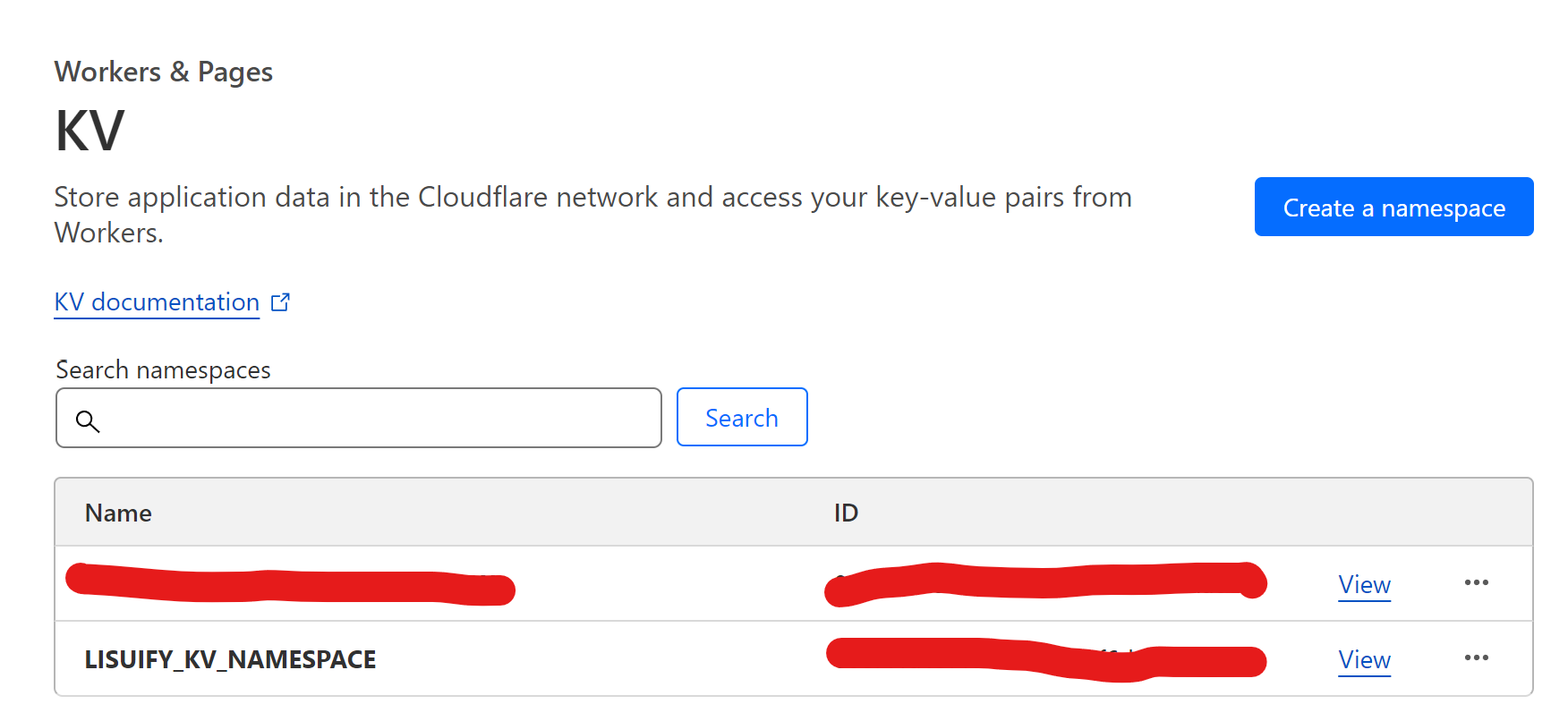
<p>In example, I created KV namespace name <code>LISUIFY_KV_NAMESPACE</code></p>
<p><img src="/img/in-post/2023-9-22-deploy-astro-on-clouflare-page/cloudflare-kv-namespace.png" alt="cloudflare kv namespace" /></p>
<h2 id="typing">Typing</h2>
<p>Before using Cloudflare Functions on your TypeScript code, you need to define type for the project by using Astro <code>env.d.ts</code>.</p>
<p>env.d.ts</p>
<div class="language-ts highlighter-rouge"><div class="highlight"><pre class="highlight"><code><span class="c1">/// &lt;reference types="astro/client" /&gt;</span>

<span class="kd">type</span> <span class="nx">KVNamespace</span> <span class="o">=</span> <span class="k">import</span><span class="p">(</span><span class="dl">"</span><span class="s2">@cloudflare/workers-types</span><span class="dl">"</span><span class="p">).</span><span class="nx">KVNamespace</span><span class="p">;</span>
<span class="kd">type</span> <span class="nx">ENV</span> <span class="o">=</span> <span class="p">{</span>
  <span class="c1">// replace `LISUIFY_KV_NAMESPACE` with your KV namespace</span>
  <span class="na">LISUIFY_KV_NAMESPACE</span><span class="p">:</span> <span class="nx">KVNamespace</span><span class="p">;</span>
<span class="p">};</span>

<span class="c1">// use `AdvanceRuntime&lt;ENV&gt;` for advance runtime mode</span>
<span class="kd">type</span> <span class="nx">Runtime</span> <span class="o">=</span> <span class="k">import</span><span class="p">(</span><span class="dl">"</span><span class="s2">@astrojs/cloudflare</span><span class="dl">"</span><span class="p">).</span><span class="nx">DirectoryRuntime</span><span class="o">&lt;</span><span class="nx">ENV</span><span class="o">&gt;</span><span class="p">;</span>
<span class="kr">declare</span> <span class="k">namespace</span> <span class="nx">App</span> <span class="p">{</span>
  <span class="kr">interface</span> <span class="nx">Locals</span> <span class="kd">extends</span> <span class="nx">Runtime</span> <span class="p">{}</span>
<span class="p">}</span>
</code></pre></div></div>
<h2 id="use-cloudflare-kv-on-astro-page">Use Cloudflare KV on Astro Page</h2>
<p>The example code show how to use Cloudflare KV inside <code>.astro</code> page to render the content before response to client (SSR).</p>
<div class="language-ts highlighter-rouge"><div class="highlight"><pre class="highlight"><code><span class="kd">const</span> <span class="nx">chacheKey</span> <span class="o">=</span> <span class="dl">"</span><span class="s2">stats</span><span class="dl">"</span><span class="p">;</span>

<span class="kd">const</span> <span class="nx">kvNamespace</span> <span class="o">=</span> <span class="nx">Astro</span><span class="p">.</span><span class="nx">locals</span><span class="p">.</span><span class="nx">runtime</span><span class="p">.</span><span class="nx">env</span><span class="p">.</span><span class="nx">LISUIFY_KV_NAMESPACE</span><span class="p">;</span>
<span class="kd">const</span> <span class="nx">statsKV</span> <span class="o">=</span> <span class="k">await</span> <span class="nx">kvNamespace</span><span class="p">.</span><span class="kd">get</span><span class="p">(</span><span class="nx">chacheKey</span><span class="p">);</span>

<span class="k">if</span> <span class="p">(</span><span class="nx">statsKV</span><span class="p">)</span> <span class="p">{</span>
  <span class="c1">// stats cache hitted</span>
<span class="p">}</span> <span class="k">else</span> <span class="p">{</span>
  <span class="c1">// fetch stats</span>
<span class="p">}</span>

<span class="c1">// put to kv, for the next api call</span>
<span class="k">await</span> <span class="nx">kvNamespace</span><span class="p">.</span><span class="nx">put</span><span class="p">(</span><span class="nx">chacheKey</span><span class="p">,</span> <span class="nx">JSON</span><span class="p">.</span><span class="nx">stringify</span><span class="p">(</span><span class="nx">stats</span><span class="p">),</span> <span class="p">{</span>
  <span class="na">expirationTtl</span><span class="p">:</span> <span class="mi">600</span><span class="p">,</span> <span class="c1">// remove in 600 seconds</span>
<span class="p">});</span>
</code></pre></div></div>
<p>This code create to reduce numbers of stats fetching by cache into Cloudflare KV on the server side because the stats is the same on every clients to see at the time and use <code>expirationTtl: 600</code> to make it update every 600 seconds.</p>
<h2 id="client-cache-control-headers">Client Cache Control Headers</h2>
<p>tell client brower to cache the page by Cache-Control headers and Functions Middleware</p>
<p>_middleware.ts</p>
<div class="language-ts highlighter-rouge"><div class="highlight"><pre class="highlight"><code><span class="k">export</span> <span class="kd">const</span> <span class="nx">onRequestOptions</span><span class="p">:</span> <span class="nx">PagesFunction</span> <span class="o">=</span> <span class="k">async</span> <span class="p">()</span> <span class="o">=&gt;</span> <span class="p">{</span>
  <span class="k">return</span> <span class="k">new</span> <span class="nx">Response</span><span class="p">(</span><span class="kc">null</span><span class="p">,</span> <span class="p">{</span>
    <span class="na">status</span><span class="p">:</span> <span class="mi">204</span><span class="p">,</span>
    <span class="na">headers</span><span class="p">:</span> <span class="p">{</span>
      <span class="dl">"</span><span class="s2">Access-Control-Allow-Methods</span><span class="dl">"</span><span class="p">:</span> <span class="dl">"</span><span class="s2">GET, OPTIONS</span><span class="dl">"</span><span class="p">,</span>
      <span class="dl">"</span><span class="s2">Access-Control-Max-Age</span><span class="dl">"</span><span class="p">:</span> <span class="dl">"</span><span class="s2">86400</span><span class="dl">"</span><span class="p">,</span>
    <span class="p">},</span>
  <span class="p">});</span>
<span class="p">};</span>

<span class="k">export</span> <span class="kd">const</span> <span class="nx">onRequest</span><span class="p">:</span> <span class="nx">PagesFunction</span> <span class="o">=</span> <span class="k">async</span> <span class="p">(</span><span class="nx">context</span><span class="p">)</span> <span class="o">=&gt;</span> <span class="p">{</span>
  <span class="kd">const</span> <span class="nx">response</span> <span class="o">=</span> <span class="k">await</span> <span class="nx">context</span><span class="p">.</span><span class="nx">next</span><span class="p">();</span>
  <span class="nx">response</span><span class="p">.</span><span class="nx">headers</span><span class="p">.</span><span class="kd">set</span><span class="p">(</span><span class="dl">"</span><span class="s2">Cache-Control</span><span class="dl">"</span><span class="p">,</span> <span class="dl">"</span><span class="s2">public, max-age=600</span><span class="dl">"</span><span class="p">);</span>
  <span class="k">return</span> <span class="nx">response</span><span class="p">;</span>
<span class="p">};</span>
</code></pre></div></div>
<p>the cache is <code>max-age=600</code> mean 600 seconds or 10 minutes, <code>public</code> it will store in shared cache include CDN.</p>
<p>Read more about Functions Middleware: <a href="https://developers.cloudflare.com/pages/platform/functions/middleware">https://developers.cloudflare.com/pages/platform/functions/middleware</a></p>
<h2 id="cloudflare-function-binding">Cloudflare Function Binding</h2>
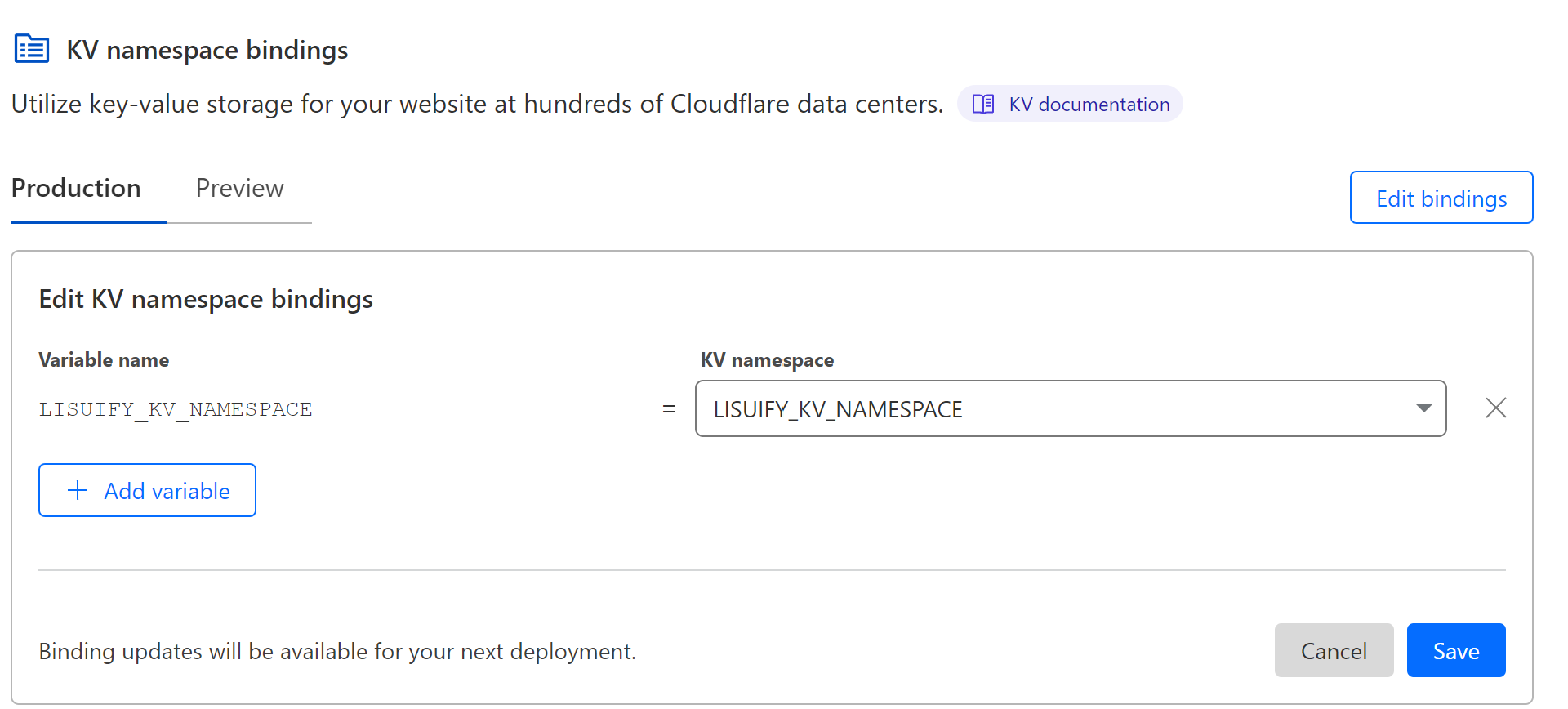
<p>Before deploy you need to add binding mapping Cloudflare Functions to your Cloudflare KV.</p>
<p>The following image shows how to map KV name space name <code>LISUIFY_KV_NAMESPACE</code> to <code>LISUIFY_KV_NAMESPACE</code> Cloudflare Functions KV variable</p>
<p><img src="/img/in-post/2023-9-22-deploy-astro-on-clouflare-page/cloudflare-functions-binding.png" alt="Cloudflare Functions Binding" /></p>
<p>Read more about Binding (I also wrote the section): <a href="https://developers.cloudflare.com/pages/framework-guides/deploy-an-astro-site/#use-bindings-in-your-astro-application">https://developers.cloudflare.com/pages/framework-guides/deploy-an-astro-site/#use-bindings-in-your-astro-application</a></p>]]></content><author><name></name></author><category term="Software Development" /><category term="Programming" /><category term="Frontend" /><category term="Cloudflare" /><summary type="html"><![CDATA[A guild to deploy Astro Hybrid Rendering site on Cloudflare Pages and Cloudflare Functions. plus Cloudflare KV binding]]></summary><media:thumbnail xmlns:media="http://search.yahoo.com/mrss/" url="https://ntsd.dev/pwa/icons/512.png" /><media:content medium="image" url="https://ntsd.dev/pwa/icons/512.png" xmlns:media="http://search.yahoo.com/mrss/" /></entry><entry><title type="html">Separate critical CSS and non-critical CSS for faster page load</title><link href="https://ntsd.dev/extract-cricital-css/" rel="alternate" type="text/html" title="Separate critical CSS and non-critical CSS for faster page load" /><published>2023-07-07T00:00:00+07:00</published><updated>2023-07-07T00:00:00+07:00</updated><id>https://ntsd.dev/extract-cricital-css</id><content type="html" xml:base="https://ntsd.dev/extract-cricital-css/"><![CDATA[<h2 id="why-inline-critical-css">Why inline Critical CSS?</h2>
<p>Critical CSS includes only the styles needed to render the Above the Fold of a webpage.</p>
<p>By delivering these styles inline in the HTML document, the browser can render this content without having to wait for the entire external CSS file to load. Non-critical CSS can load later in Asynchronous without render-blocking.</p>
<h2 id="above-the-fold">Above the fold</h2>
<p>“Above the fold” content refers to the portion of a webpage that is visible without scrolling.</p>
<p>To consider Above the Fold Dimension normally we specify the supporting media queries of the CSS framework and Breakpoints.</p>
<p>For example, In a Tailwind page that only has <code>lg</code> breakpoints means If the width size is less than <code>1024</code> will be considered as Vertical Aspect Ratios (Mobile or Tablet).</p>
<p>To calculate the Above the fold resolution size and Dimension, If the website only scrolls down so we should use the highest height possible.</p>
<p>From my research, the longest aspect ratio in mobile devices is Motorola Razr at <code>146:357</code> aspect ratio with a resolution <code>W 876 x H 2142</code> in vertical mode.</p>
<p>For Horizontal mode or screen width of more than 1024, we can use Surface Book at <code>3∶2</code> aspect ratio with a resolution of <code>W 3240 × H 2160</code>.</p>
<h2 id="install-critical-on-gulp">Install Critical on Gulp</h2>
<p>Because I am using Gulp for my website so I will show example in Gulp, but you can install it globally as you want.</p>
<p>The Library Github and document: <a href="https://github.com/addyosmani/critical">https://github.com/addyosmani/critical</a></p>
<p>Install package</p>
<p><code>npm install --save-dev critical</code></p>
<p>Create a gulp task</p>
<div class="language-javascript highlighter-rouge"><div class="highlight"><pre class="highlight"><code><span class="k">import</span> <span class="nx">gulp</span> <span class="k">from</span> <span class="dl">"</span><span class="s2">gulp</span><span class="dl">"</span><span class="p">;</span>
<span class="k">import</span> <span class="nx">path</span> <span class="k">from</span> <span class="dl">"</span><span class="s2">path</span><span class="dl">"</span><span class="p">;</span>
<span class="k">import</span> <span class="p">{</span> <span class="nx">stream</span> <span class="k">as</span> <span class="nx">critical</span> <span class="p">}</span> <span class="k">from</span> <span class="dl">"</span><span class="s2">critical</span><span class="dl">"</span><span class="p">;</span>

<span class="kd">const</span> <span class="nx">SITE_ROOT</span> <span class="o">=</span> <span class="nx">isDevelopmentBuild</span> <span class="p">?</span> <span class="dl">"</span><span class="s2">./_watch</span><span class="dl">"</span> <span class="p">:</span> <span class="dl">"</span><span class="s2">./_site</span><span class="dl">"</span><span class="p">;</span>
<span class="kd">const</span> <span class="nx">SITE_ROOT_HTML</span> <span class="o">=</span> <span class="s2">`</span><span class="p">${</span><span class="nx">SITE_ROOT</span><span class="p">}</span><span class="s2">/**/*.html`</span><span class="p">;</span>
<span class="kd">const</span> <span class="nx">POST_BUILD_STYLES</span> <span class="o">=</span> <span class="s2">`</span><span class="p">${</span><span class="nx">SITE_ROOT</span><span class="p">}</span><span class="s2">/assets/css/`</span><span class="p">;</span>

<span class="c1">// Generate &amp; Inline Critical-path CSS</span>
<span class="nx">gulp</span><span class="p">.</span><span class="nx">task</span><span class="p">(</span><span class="dl">"</span><span class="s2">critical</span><span class="dl">"</span><span class="p">,</span> <span class="p">()</span> <span class="o">=&gt;</span> <span class="p">{</span>
  <span class="k">return</span> <span class="nx">gulp</span>
    <span class="p">.</span><span class="nx">src</span><span class="p">(</span><span class="nx">SITE_ROOT_HTML</span><span class="p">)</span>
    <span class="p">.</span><span class="nx">pipe</span><span class="p">(</span>
      <span class="c1">// https://github.com/addyosmani/critical#options</span>
      <span class="nx">critical</span><span class="p">({</span>
        <span class="c1">// base directory</span>
        <span class="na">base</span><span class="p">:</span> <span class="nx">SITE_ROOT</span><span class="p">,</span>
        <span class="c1">// Inline the generated critical-path CSS</span>
        <span class="c1">// - true generates HTML</span>
        <span class="c1">// - false generates CSS</span>
        <span class="na">inline</span><span class="p">:</span> <span class="kc">true</span><span class="p">,</span>
        <span class="c1">// Extract inlined styles from referenced stylesheets</span>
        <span class="na">extract</span><span class="p">:</span> <span class="kc">false</span><span class="p">,</span>
        <span class="c1">// ignore CSS rules</span>
        <span class="na">ignore</span><span class="p">:</span> <span class="p">{},</span>
        <span class="c1">// strict true</span>
        <span class="na">strict</span><span class="p">:</span> <span class="kc">true</span><span class="p">,</span>
        <span class="c1">// css files</span>
        <span class="na">css</span><span class="p">:</span> <span class="p">[</span><span class="nx">path</span><span class="p">.</span><span class="nx">join</span><span class="p">(</span><span class="nx">POST_BUILD_STYLES</span><span class="p">,</span> <span class="dl">"</span><span class="s2">style.css</span><span class="dl">"</span><span class="p">)],</span>
        <span class="c1">// screen dimensions</span>
        <span class="na">dimensions</span><span class="p">:</span> <span class="p">[</span>
          <span class="p">{</span>
            <span class="na">width</span><span class="p">:</span> <span class="mi">876</span><span class="p">,</span>
            <span class="na">height</span><span class="p">:</span> <span class="mi">2142</span><span class="p">,</span>
          <span class="p">},</span> <span class="c1">// vertical max height</span>
          <span class="p">{</span>
            <span class="na">width</span><span class="p">:</span> <span class="mi">3240</span><span class="p">,</span>
            <span class="na">height</span><span class="p">:</span> <span class="mi">2160</span><span class="p">,</span>
          <span class="p">},</span> <span class="c1">// horizontial max height</span>
        <span class="p">],</span>
      <span class="p">})</span>
    <span class="p">)</span>
    <span class="p">.</span><span class="nx">on</span><span class="p">(</span><span class="dl">"</span><span class="s2">error</span><span class="dl">"</span><span class="p">,</span> <span class="p">(</span><span class="nx">err</span><span class="p">)</span> <span class="o">=&gt;</span> <span class="p">{</span>
      <span class="nx">console</span><span class="p">.</span><span class="nx">log</span><span class="p">(</span><span class="nx">err</span><span class="p">.</span><span class="nx">message</span><span class="p">);</span>
    <span class="p">})</span>
    <span class="p">.</span><span class="nx">pipe</span><span class="p">(</span><span class="nx">gulp</span><span class="p">.</span><span class="nx">dest</span><span class="p">(</span><span class="nx">SITE_ROOT</span><span class="p">));</span>
<span class="p">});</span>
</code></pre></div></div>
<p>Then change the style load to async load, May consider add <code>noscript</code> for non javascript support browser.</p>
<div class="language-html highlighter-rouge"><div class="highlight"><pre class="highlight"><code><span class="nt">&lt;link</span>
  <span class="na">rel=</span><span class="s">"preload"</span>
  <span class="na">href=</span><span class="s">"/assets/css/style.css"</span>
  <span class="na">as=</span><span class="s">"style"</span>
  <span class="na">onload=</span><span class="s">"this.onload=null;this.rel='stylesheet'"</span>
<span class="nt">/&gt;</span>
<span class="c">&lt;!-- below is optional --&gt;</span>
<span class="nt">&lt;noscript&gt;</span>
  <span class="nt">&lt;link</span> <span class="na">rel=</span><span class="s">"stylesheet"</span> <span class="na">href=</span><span class="s">"/assets/css/style.css"</span> <span class="nt">/&gt;</span>
<span class="nt">&lt;/noscript&gt;</span>
</code></pre></div></div>]]></content><author><name></name></author><category term="Software Development" /><category term="Programming" /><category term="Frontend" /><category term="Web Development" /><category term="Web Performance" /><category term="CSS" /><summary type="html"><![CDATA[Separate critical CSS for inline HTML and non-critical CSS for asynchronous load for a better performance page load.]]></summary><media:thumbnail xmlns:media="http://search.yahoo.com/mrss/" url="https://ntsd.dev/pwa/icons/512.png" /><media:content medium="image" url="https://ntsd.dev/pwa/icons/512.png" xmlns:media="http://search.yahoo.com/mrss/" /></entry><entry><title type="html">Persistent store for Cross-platform React applications with Recoil and Capacitor Preferences</title><link href="https://ntsd.dev/recoil-persistent-with-capacitor-preferences/" rel="alternate" type="text/html" title="Persistent store for Cross-platform React applications with Recoil and Capacitor Preferences" /><published>2023-07-06T00:00:00+07:00</published><updated>2023-07-06T00:00:00+07:00</updated><id>https://ntsd.dev/recoil-persistent-with-capacitor-preferences</id><content type="html" xml:base="https://ntsd.dev/recoil-persistent-with-capacitor-preferences/"><![CDATA[<h2 id="capacitor-preferences">Capacitor Preferences</h2>
<p><a href="https://capacitorjs.com/docs/apis/preferences">Capacitor Preferences</a> is a Capacitor plugin to allow Capacitor applications to store persistent data.</p>
<p>The Preferences API provides a simple key/value persistent store for lightweight data.</p>
<p>Mobile OSs may periodically clear data set in window.localStorage, so this API should be used instead. This API will fall back to using localStorage when running as a Progressive Web App.</p>
<p>This plugin will use UserDefaults on iOS and SharedPreferences on Android. Stored data is cleared if the app is uninstalled.</p>
<h2 id="custom-recoil-atom-effect">Custom Recoil Atom Effect</h2>
<p>The customize for Atom Effect to store data in Capacitor Preferences instead of Memory for persistent data.</p>
<p>This code makes customized to get, set, and remove the data by the store key.</p>
<ul>
<li>Instead of Capacitor Preferences you can replace with any Library you want.</li>
</ul>
<div class="language-javascript highlighter-rouge"><div class="highlight"><pre class="highlight"><code><span class="k">import</span> <span class="p">{</span> <span class="nx">Preferences</span> <span class="p">}</span> <span class="k">from</span> <span class="dl">"</span><span class="s2">@capacitor/preferences</span><span class="dl">"</span><span class="p">;</span>
<span class="k">import</span> <span class="p">{</span> <span class="nx">AtomEffect</span> <span class="p">}</span> <span class="k">from</span> <span class="dl">"</span><span class="s2">recoil</span><span class="dl">"</span><span class="p">;</span>

<span class="k">export</span> <span class="kd">const</span> <span class="nx">persistentStorageEffect</span> <span class="o">=</span> <span class="o">&lt;</span><span class="nx">T</span><span class="o">&gt;</span><span class="p">(</span><span class="nx">key</span><span class="p">:</span> <span class="nx">string</span><span class="p">):</span> <span class="nx">AtomEffect</span><span class="o">&lt;</span><span class="nx">T</span><span class="o">&gt;</span> <span class="o">=&gt;</span> <span class="p">{</span>
  <span class="k">return</span> <span class="p">({</span> <span class="nx">setSelf</span><span class="p">,</span> <span class="nx">onSet</span><span class="p">,</span> <span class="nx">trigger</span> <span class="p">})</span> <span class="o">=&gt;</span> <span class="p">{</span>
    <span class="kd">const</span> <span class="nx">loadPersisted</span> <span class="o">=</span> <span class="k">async</span> <span class="p">()</span> <span class="o">=&gt;</span> <span class="p">{</span>
      <span class="kd">const</span> <span class="nx">getResult</span> <span class="o">=</span> <span class="k">await</span> <span class="nx">Preferences</span><span class="p">.</span><span class="kd">get</span><span class="p">({</span> <span class="nx">key</span> <span class="p">});</span>

      <span class="k">if</span> <span class="p">(</span><span class="nx">getResult</span><span class="p">.</span><span class="nx">value</span> <span class="o">!=</span> <span class="kc">null</span><span class="p">)</span> <span class="p">{</span>
        <span class="nx">setSelf</span><span class="p">(</span><span class="nx">JSON</span><span class="p">.</span><span class="nx">parse</span><span class="p">(</span><span class="nx">getResult</span><span class="p">.</span><span class="nx">value</span><span class="p">));</span>
      <span class="p">}</span>
    <span class="p">};</span>

    <span class="k">if</span> <span class="p">(</span><span class="nx">trigger</span> <span class="o">===</span> <span class="dl">"</span><span class="s2">get</span><span class="dl">"</span><span class="p">)</span> <span class="p">{</span>
      <span class="nx">loadPersisted</span><span class="p">();</span>
    <span class="p">}</span>

    <span class="nx">onSet</span><span class="p">((</span><span class="nx">newValue</span><span class="p">,</span> <span class="nx">_</span><span class="p">,</span> <span class="nx">isReset</span><span class="p">)</span> <span class="o">=&gt;</span> <span class="p">{</span>
      <span class="k">if</span> <span class="p">(</span><span class="nx">isReset</span><span class="p">)</span> <span class="p">{</span>
        <span class="nx">Preferences</span><span class="p">.</span><span class="nx">remove</span><span class="p">({</span> <span class="nx">key</span> <span class="p">});</span>
      <span class="p">}</span> <span class="k">else</span> <span class="p">{</span>
        <span class="nx">Preferences</span><span class="p">.</span><span class="kd">set</span><span class="p">({</span> <span class="nx">key</span><span class="p">,</span> <span class="na">value</span><span class="p">:</span> <span class="nx">JSON</span><span class="p">.</span><span class="nx">stringify</span><span class="p">(</span><span class="nx">newValue</span><span class="p">)</span> <span class="p">});</span>
      <span class="p">}</span>
    <span class="p">});</span>
  <span class="p">};</span>
<span class="p">};</span>
</code></pre></div></div>
<h2 id="how-to-use-the-atom-effect">How to use the Atom Effect</h2>
<p>You can simply put it in the Atom Options on effects parameters, you can also put other effects as well.</p>
<div class="language-javascript highlighter-rouge"><div class="highlight"><pre class="highlight"><code><span class="k">import</span> <span class="p">{</span> <span class="nx">atom</span> <span class="p">}</span> <span class="k">from</span> <span class="dl">"</span><span class="s2">recoil</span><span class="dl">"</span><span class="p">;</span>
<span class="k">import</span> <span class="p">{</span> <span class="nx">persistentStorageEffect</span> <span class="p">}</span> <span class="k">from</span> <span class="dl">"</span><span class="s2">./utils</span><span class="dl">"</span><span class="p">;</span>
<span class="k">import</span> <span class="nx">type</span> <span class="p">{</span> <span class="nx">Settings</span> <span class="p">}</span> <span class="k">from</span> <span class="dl">"</span><span class="s2">../types</span><span class="dl">"</span><span class="p">;</span>

<span class="k">export</span> <span class="kd">const</span> <span class="nx">settingsState</span> <span class="o">=</span> <span class="nx">atom</span><span class="o">&lt;</span><span class="nx">Settings</span><span class="o">&gt;</span><span class="p">({</span>
  <span class="na">key</span><span class="p">:</span> <span class="dl">"</span><span class="s2">settings</span><span class="dl">"</span><span class="p">,</span>
  <span class="na">default</span><span class="p">:</span> <span class="p">{</span>
    <span class="na">darkMode</span><span class="p">:</span> <span class="kc">true</span><span class="p">,</span>
  <span class="p">},</span>
  <span class="na">effects</span><span class="p">:</span> <span class="p">[</span><span class="nx">persistentStorageEffect</span><span class="o">&lt;</span><span class="nx">Settings</span><span class="o">&gt;</span><span class="p">(</span><span class="dl">"</span><span class="s2">settings</span><span class="dl">"</span><span class="p">)],</span>
<span class="p">});</span>
</code></pre></div></div>]]></content><author><name></name></author><category term="Software Development" /><category term="Mobile Development" /><category term="Web Development" /><category term="Recoil" /><category term="Capacitor" /><category term="React" /><category term="Programming" /><category term="Frontend" /><summary type="html"><![CDATA[Make Recoil persistent for Cross-Platform React Applications. worked for iOS, Android, Website, and PWA.]]></summary><media:thumbnail xmlns:media="http://search.yahoo.com/mrss/" url="https://ntsd.dev/pwa/icons/512.png" /><media:content medium="image" url="https://ntsd.dev/pwa/icons/512.png" xmlns:media="http://search.yahoo.com/mrss/" /></entry><entry><title type="html">My kubectl commands cheat sheet</title><link href="https://ntsd.dev/my-kubectl-cheat-sheet/" rel="alternate" type="text/html" title="My kubectl commands cheat sheet" /><published>2022-09-02T00:00:00+07:00</published><updated>2022-09-02T00:00:00+07:00</updated><id>https://ntsd.dev/my-kubectl-cheat-sheet</id><content type="html" xml:base="https://ntsd.dev/my-kubectl-cheat-sheet/"><![CDATA[<p>As a developer sometimes I need to debug or investigate problems on the cloud machine. so I create this cheat sheet to note the commands. And it might be good to share with people who are just getting started with the Kubernetes.</p>
<h2 id="pod-namespace-and-deployment">Pod, Namespace, and Deployment</h2>
<p>to using kubectl, the reader need to know some knowledge about pod, namespace, and containers in Kubernetes.</p>
<h3 id="container">Container</h3>
<p>Kubernates Container is similar to Docker Container it will include software or package to runnning on it environments or OS. And the pre running container is calling Container Image similar to Docker Image.</p>
<h3 id="pod">Pod</h3>
<p>Pod is the smallest computing unit in Kubernetes that will share resource and storage. One pod can have multiple containers.</p>
<h3 id="namespace">Namespace</h3>
<p>namespace will use to define the unique name of group or cluster for multiple objects. normally they will use namespace to specific team or project for make it easier to manage and avoid the effect between team or project.</p>
<h3 id="deployment">Deployment</h3>
<p>A resource object in Kubernetes that provides declarative updates to applications. for example image, number of pods, etc. normallt it will write in <code>.yaml</code> format.</p>
<h2 id="google-kubernetes-engine-cluster">Google Kubernetes Engine Cluster</h2>
<p>to make the kubectl work, we need to set the config. for manual set can follow this guide <a href="https://kubernetes.io/docs/tasks/access-application-cluster/access-cluster/">https://kubernetes.io/docs/tasks/access-application-cluster/access-cluster/</a>.</p>
<p>I am using Google Kubernetes Engine (GKE) they have the gcloud container command to allow me to manage containers and cluster easier.</p>
<p>to map configuration with gcloud cli</p>
<div class="language-bash highlighter-rouge"><div class="highlight"><pre class="highlight"><code><span class="c"># init gcloud</span>
gcloud init

<span class="c"># login</span>
gcloud auth login

<span class="c"># list gcloud config</span>
gcloud config list

<span class="c"># list project</span>
gcloud projects list

<span class="c"># list clusters by project</span>
gcloud container clusters list <span class="nt">--project</span> &lt;project-name&gt;

<span class="c"># map kubectl config, for zone copy from the `Location` when list cluster</span>
gcloud container clusters get-credentials &lt;cluster-name&gt; <span class="nt">--zone</span> &lt;zone&gt;

<span class="c"># check kubectl config</span>
kubectl config view
</code></pre></div></div>
<p>After this your kubectl will using access from the gcloud cluster</p>
<h2 id="kubectl-commands">Kubectl commands</h2>
<h3 id="config">Config</h3>
<p>The cluster is the physical platform where all Kubernetes components, capabilities, and workloads are configured.</p>
<p>The context is a set of access parameters that contains a Kubernetes cluster, a user, and a namespace.</p>
<div class="language-bash highlighter-rouge"><div class="highlight"><pre class="highlight"><code><span class="c"># list contexts</span>
kubectl config get-contexts

<span class="c"># set context</span>
kubectl config set-context &lt;context-name&gt;

<span class="c"># list clusters</span>
kubectl config get-clusters

<span class="c"># set cluster</span>
kubectl config set-cluster &lt;cluster-name&gt;
</code></pre></div></div>
<h3 id="kubectl-apply">Kubectl apply</h3>
<pre><code>kubectl apply -f ./my-manifest.yaml
kubectl apply -f ./my1.yaml -f ./my2.yaml
kubectl apply -f ./dir
</code></pre>
<h3 id="run-a-pod">Run a Pod</h3>
<p><code>kubectl run busybox --image=busybox --command --restart=Never -- tail -f /dev/null</code></p>
<h3 id="find-resource-name">Find resource name</h3>
<p>Resource name will help to identify the Kubernates resource and target such as Service, Pod, Deployment, etc.</p>
<h4 id="list-pods">List pods</h4>
<div class="language-bash highlighter-rouge"><div class="highlight"><pre class="highlight"><code><span class="c"># list pods by all namespaces</span>
kubectl get pod <span class="nt">-A</span>

<span class="c"># list pods by namespace</span>
kubectl get pod <span class="nt">-n</span> &lt;name-space&gt;
</code></pre></div></div>
<h4 id="list-deployment">List deployment</h4>
<div class="language-bash highlighter-rouge"><div class="highlight"><pre class="highlight"><code><span class="c"># list deployment by namespace</span>
kubectl get deployment <span class="nt">-n</span> &lt;name-space&gt;
</code></pre></div></div>
<h4 id="list-all">List all</h4>
<div class="language-bash highlighter-rouge"><div class="highlight"><pre class="highlight"><code><span class="c"># list all by namespace</span>
kubectl get all <span class="nt">-n</span> &lt;name-space&gt;

<span class="c"># list service, pod, and deployment by namespace</span>
kubectl get service,pod,deployment <span class="nt">-n</span> &lt;name-space&gt;
</code></pre></div></div>
<h4 id="describe">Describe</h4>
<div class="language-bash highlighter-rouge"><div class="highlight"><pre class="highlight"><code>kubectl describe nodes &lt;name-node&gt;
kubectl describe pods &lt;name-pod&gt;
</code></pre></div></div>
<h4 id="logs">Logs</h4>
<div class="language-bash highlighter-rouge"><div class="highlight"><pre class="highlight"><code><span class="c"># get pod logs</span>
kubectl logs &lt;pod-name&gt;

<span class="c"># get pod logs stream</span>
kubectl logs <span class="nt">-f</span> &lt;pod-name&gt;

<span class="c"># get deployment logs</span>
kubectl logs deploy/&lt;deployment-name&gt;
</code></pre></div></div>
<h4 id="get-expose-port">Get expose port</h4>
<div class="language-bash highlighter-rouge"><div class="highlight"><pre class="highlight"><code>kubectl get svc <span class="nt">-n</span> &lt;name-space&gt;
</code></pre></div></div>
<h3 id="environment">Environment</h3>
<div class="language-bash highlighter-rouge"><div class="highlight"><pre class="highlight"><code><span class="c"># set env</span>
kubectl <span class="nb">set env</span> &lt;resource-name&gt; <span class="nt">-n</span> &lt;name-space&gt; <span class="o">{</span>ENV_NAME<span class="o">}={</span>ENV_VALUE<span class="o">}</span>

<span class="c"># remove env, to remove env need to add `-` after the env name</span>
kubectl <span class="nb">set env</span> &lt;resource-name&gt; <span class="nt">-n</span> &lt;name-space&gt; <span class="o">{</span>ENV_NAME<span class="o">}</span>-

<span class="c"># list all pods env</span>
kubectl <span class="nb">set env </span>pods <span class="nt">--all</span> <span class="nt">--list</span>
</code></pre></div></div>
<h3 id="forward-port">Forward port</h3>
<p>Forward port will allow you access to the Kubernates cluster and mapping with your local port</p>
<div class="language-bash highlighter-rouge"><div class="highlight"><pre class="highlight"><code>kubectl port-forward <span class="nt">-n</span> &lt;name-space&gt; &lt;resource-name&gt; &lt;local-port&gt;:&lt;resource-port&gt;

<span class="c"># example</span>
kubectl port-forward <span class="nt">-n</span> &lt;name-space&gt; &lt;resource-name&gt; 8080:80
</code></pre></div></div>
<h3 id="exec">Exec</h3>
<p>runnning shell on Kubectl pod</p>
<p>if you familiar to Docker it work similar to <code>docker exec</code></p>
<div class="language-bash highlighter-rouge"><div class="highlight"><pre class="highlight"><code><span class="c"># run shell command</span>
kubectl <span class="nt">-n</span> &lt;name-space&gt; <span class="nb">exec</span> &lt;pod-name&gt; <span class="nt">--</span> &lt;cmd&gt;

<span class="c"># get env of pod by shell</span>
kubectl <span class="nt">-n</span> &lt;name-space&gt; <span class="nb">exec</span> &lt;pod-name&gt; <span class="nt">--</span> <span class="nb">env</span>

<span class="c"># interactive mode</span>
kubectl <span class="nt">-n</span> &lt;name-space&gt; <span class="nb">exec</span> <span class="nt">-it</span> &lt;pod-name&gt; <span class="nt">--</span> bash
</code></pre></div></div>]]></content><author><name></name></author><category term="Software Development" /><category term="Kubernetes" /><category term="Google Cloud Platform" /><summary type="html"><![CDATA[My useful kubectl commands cheat sheet and Google Kubernetes Engine cluster (GKE) set up]]></summary><media:thumbnail xmlns:media="http://search.yahoo.com/mrss/" url="https://ntsd.dev/pwa/icons/512.png" /><media:content medium="image" url="https://ntsd.dev/pwa/icons/512.png" xmlns:media="http://search.yahoo.com/mrss/" /></entry><entry><title type="html">How to manage multiple Git accounts</title><link href="https://ntsd.dev/git-multiple-accounts/" rel="alternate" type="text/html" title="How to manage multiple Git accounts" /><published>2022-01-28T00:00:00+07:00</published><updated>2022-01-28T00:00:00+07:00</updated><id>https://ntsd.dev/git-multiple-accounts</id><content type="html" xml:base="https://ntsd.dev/git-multiple-accounts/"><![CDATA[<h2 id="set-up-ssh-keys-for-multi-git-accounts">Set up SSH keys for multi git accounts</h2>
<h3 id="generate-ssh-keys">1. Generate SSH keys</h3>
<p>Generate multiple SSH keys one for work and one for personal. You can have many multiple ssh key-pair for multiple git accounts as you want.</p>
<div class="language-shell highlighter-rouge"><div class="highlight"><pre class="highlight"><code><span class="nb">cd</span> ~/.ssh
ssh-keygen <span class="nt">-t</span> ed25519 <span class="nt">-C</span> <span class="s2">"your_personal_email@gmail.com"</span> <span class="nt">-f</span> <span class="s2">"id_ed25519_git"</span>
ssh-keygen <span class="nt">-t</span> ed25519 <span class="nt">-C</span> <span class="s2">"jirawat@opn.ooo"</span> <span class="nt">-f</span> <span class="s2">"id_ed25519_git_opn"</span>
</code></pre></div></div>
<p><code>-t</code>: Specific key type <code>ed25519</code> or <code>rsa</code></p>
<p><code>-C</code>: Specific comment</p>
<p>You will get 2 pairs of the SSH key-pair.</p>
<p>Private keys will name <code>id_ed25519_git</code> and <code>id_ed25519_git_opn</code>.</p>
<p>Public keys will name <code>id_ed25519_git.pub</code> and <code>id_ed25519_git_opn.pub</code>.</p>
<h3 id="add-public-keys-to-the-git-provider-gihubgitlabetc">2. Add public keys to the Git Provider (Gihub/Gitlab/etc)</h3>
<p>You have already generated the key pairs, Now let the Git provider know your SSH public key.</p>
<ol>
<li>Copy the public key <code>pbcopy &lt; ~/.ssh/id_ed25519_git_opn.pub</code> (avoid copy your private key)</li>
<li>Go to your git provider ssh setup panel
<a href="https://github.com/settings/keys">https://github.com/settings/keys</a> for Gihub
<a href="https://gitlab.com/-/profile/keys">https://gitlab.com/-/profile/keys</a> for Gitlab</li>
<li>Paste the SSH public key and the Title you want</li>
<li>Generate a signature using the giving token from provider <code>echo -n 'token' | ssh-keygen -Y sign -n &lt;name-space&gt; -f id_ed25519_git.pub</code> you can replace the namespace</li>
<li>Apply the signature to the provider to verify</li>
</ol>
<p>Next, do another one for the Github personal <code>pbcopy &lt; ~/.ssh/id_ed25519_git.pub</code> to your personal git provider.</p>
<h3 id="creating-the-ssh-config-optional">3. Creating the SSH Config (optional)</h3>
<p>The SSH Config will help you choose the SSH key when you try to sign in to a different host.</p>
<div class="language-shell highlighter-rouge"><div class="highlight"><pre class="highlight"><code><span class="nb">touch </span>config
vi config
</code></pre></div></div>
<p>Create and edit the ssh config file at <code>~/.ssh/config</code></p>
<div class="language-text highlighter-rouge"><div class="highlight"><pre class="highlight"><code># Personal Account
Host github.com
   HostName github.com
   User git
   IdentityFile ~/.ssh/id_ed25519_git

# Work Account
Host github.com-jirawat-opn
   HostName github.com
   User git
   IdentityFile ~/.ssh/id_ed25519_git_opn
</code></pre></div></div>
<p>Now you can clone or update your git URL.</p>
<div class="language-shell highlighter-rouge"><div class="highlight"><pre class="highlight"><code>git clone git@github.com-jirawat-opn:work_account/repo.git

<span class="c"># or the set origin url for the current repo</span>

git remote set-url origin git@github.com-jirawat-opn:work_account/repo.git
</code></pre></div></div>
<p>For the personal git you can just do the normal way</p>
<div class="language-shell highlighter-rouge"><div class="highlight"><pre class="highlight"><code>git clone git@github.com:personal_account/repo.git

<span class="c"># or the set origin url for the current repo</span>

git remote set-url origin git@github.com:personal_account/repo.git
</code></pre></div></div>
<h2 id="set-up-gpg-keys-for-multi-git-accounts-optional">Set up GPG keys for multi git accounts (optional)</h2>
<h3 id="generate-a-new-gpg-key">1. Generate a new GPG key</h3>
<p><code>gpg --default-new-key-algo ed25519 --gen-key</code></p>
<p>and follow the prompt dialog.</p>
<h3 id="generate-public-key">2. Generate public key</h3>
<p>First, list all your GPG private keys</p>
<p><code>gpg --list-secret-keys --keyid-format=long</code></p>
<p>The key id will follow the key method <code>ed25519/</code></p>
<p>for example</p>
<div class="language-shell highlighter-rouge"><div class="highlight"><pre class="highlight"><code>sec   ed25519/3AA5C34371567BD2 2021-11-23 <span class="o">[</span>SC]
uid                 <span class="o">[</span>ultimate] Jirawat Boonkumnerd &lt;jirawat@opn.ooo&gt;
ssb   cv25519/127C6D28828B3B8C 2021-11-23 <span class="o">[</span>E]
</code></pre></div></div>
<p>in this case the key id is <code>3AA5C34371567BD2</code></p>
<h3 id="add-a-new-uid-and-email-to-the-key">3. Add a new uid and email to the key</h3>
<p>3.1 <code>gpg --edit-key 3AA5C34371567BD2</code> to edit the key</p>
<p>3.2 <code>adduid</code> to add a new uid then fill your uid info and the another email</p>
<p>3.3 <code>uid</code> to show uid list</p>
<p>3.4 <code>uid 2</code> to choose uid 2</p>
<p>3.5 <code>trust</code> to trust the uid type <code>5</code> to ultimate trust then <code>y</code></p>
<p>3.6 <code>save</code> the save edit</p>
<h3 id="add-public-keys-to-the-git-provider">4. Add public keys to the Git Provider</h3>
<p>export the public key</p>
<p><code>gpg --armor --export 3AA5C34371567BD2</code></p>
<p>Copy your GPG key and add to the Git provider. It may the same page as the SSH key.</p>
<p>If it ask to verify by a token, you can generate signature by using</p>
<p><code>echo &quot;token&quot; | gpg -a --default-key 3AA5C34371567BD2 --detach-sig</code></p>
<h3 id="set-up-git-config-to-use-the-gpg-key-optional">5. Set up git config to use the GPG key (optional)</h3>
<p><code>git config --global user.signingkey 3AA5C34371567BD2</code></p>
<p>You can also edit the <code>~/.gitconfig</code></p>
<p>or for specific repo</p>
<p><code>git config user.signingkey 3AA5C34371567BD2</code></p>
<p>craete a sign commit</p>
<p><code>git commit -S -m 'test'</code></p>
<p>to make it automatically sign commits</p>
<p><code>git config --global commit.gpgsign true</code></p>
<h2 id="set-git-config-to-use-specific-ssh-and-gpg-keys">Set Git config to use specific SSH and GPG keys</h2>
<p>Add <code>sshCommand</code> config to use the specific ssh key for personal account,</p>
<p>and add include config for work account</p>
<p><code>~/.gitconfig</code></p>
<pre><code>[user]
	name = ntsd
   email = jo06942@gmail.com
	signingkey = 3AA5C34371567BD2

[github]
	user = ntsd

[commit]
	gpgsign = true

[core]
   sshCommand = ssh -i ~/.ssh/id_ed25519_git

# include config if the path for company repo
[includeIf &quot;gitdir/i:opn/&quot;]
   path = .gitconfig.opn
</code></pre>
<p>for includeIf config will include the work config if the git directory under folder <code>opn</code> which is my work directory</p>
<p><code>~/.gitconfig.opn</code></p>
<pre><code>[user]
   name = Jirawat Boonkumnerd
   email = jirawat@opn.ooo

[github]
	user = jirawat-opn

[core]
   # specific ssh key for git
   sshCommand = ssh -i ~/.ssh/id_ed25519_git_opn
</code></pre>]]></content><author><name></name></author><category term="Software Development" /><category term="Git" /><category term="Security" /><summary type="html"><![CDATA[How I set up multi SSH keys for multiple git accounts, To make Git can use the personal git and work git at the same time.]]></summary><media:thumbnail xmlns:media="http://search.yahoo.com/mrss/" url="https://ntsd.dev/pwa/icons/512.png" /><media:content medium="image" url="https://ntsd.dev/pwa/icons/512.png" xmlns:media="http://search.yahoo.com/mrss/" /></entry><entry><title type="html">Reduce runtime JavaScript to improve page speed using Puppeteer</title><link href="https://ntsd.dev/reduce-runtime-javascript-using-puppeeteer/" rel="alternate" type="text/html" title="Reduce runtime JavaScript to improve page speed using Puppeteer" /><published>2021-11-03T00:00:00+07:00</published><updated>2021-11-03T00:00:00+07:00</updated><id>https://ntsd.dev/reduce-runtime-javascript-using-puppeeteer</id><content type="html" xml:base="https://ntsd.dev/reduce-runtime-javascript-using-puppeeteer/"><![CDATA[<p>The problem is when I am using many JavaScript libraries with big sizes and unnecessary to run in runtime such as <a href="https://github.com/PrismJS/prism">PrismJS</a>, <a href="https://github.com/bryanbraun/anchorjs">AnchorJS</a>, and <a href="https://github.com/timdream/wordcloud2.js/">Wordcloud2</a>. All of these JavaScript libraries will load content from HTML and render it component by adding element classes and styles.</p>
<p>In this example, I will show how to use <a href="https://github.com/PrismJS/prism">PrismJS</a> without runtime JavaScript because it’s the biggest library I’m using. To do that I need <a href="https://github.com/puppeteer/puppeteer">Puppeteer</a> headless Chrome for NodeAPI.</p>
<p>First of all, I download PrismJS from the <a href="https://prismjs.com/download.html">download page</a> and just select all languages then download JavaScript and CSS files. Put both on the HTML page. It took 500kb of JavaScript and 14kb of CSS.</p>
<pre><code class="language-HTML">>&lt;script type=&quot;text/javascript&quot; src=&quot;/assets/js/prism.js&quot; data-post-js=&quot;true&quot; &gt;&lt;/script&gt;
</code></pre>
<p>I have a custom <a href="https://developer.mozilla.org/en-US/docs/Learn/HTML/Howto/Use_data_attributes">data attributes</a> name <code>data-post-js</code> which I’ll use to specific JavaScript tag for render before runtime. I call it Post JS because it works like PostCSS that will run on build only.</p>
<p>For JavaScript I want it to run on runtime I use to type <code>text/runtime-javascript</code> to avoid running in the Puppeteer.</p>
<pre><code class="language-HTML">>&lt;script type='text/runtime-javascript' async&gt;
&lt;/script&gt;
</code></pre>
<p>To make it work I create a <a href="https://github.com/gulpjs/gulp">Gulp</a> task when building the page. I want to make Puppeteer run and render the HTML page. Explain below.</p>
<pre><code class="language-JavaScript">>gulp.task(&quot;post-js&quot;, async () =&gt; {
  browserSync.init({
    files: [SITE_ROOT + &quot;/**&quot;],
    open: false,
    port: 7000,
    server: {
      baseDir: SITE_ROOT,
      serveStaticOptions: {
        extensions: [&quot;html&quot;],
      },
    },
  });

  await new Promise(resolve =&gt; setTimeout(resolve, 3000)); // wait browserSync run

  return gulp.src(SITE_ROOT_HTML, { base: SITE_ROOT })
    .pipe(through2.obj(async (file, _, cb) =&gt; {
      if (!file.isBuffer()) { // not support type
        return cb(null, file);
      }

      const relativeRootPath = path.relative(process.cwd(), file.path);
      const relativePath = path.relative(SITE_ROOT, relativeRootPath);

      console.log(`Rendering ${relativePath}`);

      const browser = await puppeteer.launch();
      const page = await browser.newPage();

      await page.goto(`http://localhost:7000/${relativePath}`, { waitUntil: 'networkidle0' });

      let body = await page.evaluate(() =&gt; {
        // remove data-post-js script
        const unusedElements = document.querySelectorAll('script[data-post-js=&quot;true&quot;]');
        for (let i = 0; i &lt; unusedElements.length; i++) {
          unusedElements[i].parentNode.removeChild(unusedElements[i]);
        }
        return document.documentElement.outerHTML;
      });

      // replace script type type=&quot;text/runtime-javascript&quot; to type&quot;text/javascript&quot;
      body = body.replace(/type\=\&quot;text\/runtime\-javascript\&quot;/g, 'type=&quot;text/javascript&quot;');

      // DOCTYPE is gone when puppeteer run
      body = '&lt;!DOCTYPE html&gt;' + body;

      file.contents = Buffer.from(body);

      await browser.close();

      cb(null, file);
    }))
    .pipe(htmlmin({ collapseWhitespace: true }))
    .pipe(gulp.dest(SITE_ROOT))
    .on('end', () =&gt; {
      browserSync.exit();
      console.log('post-js finished');
    });
});
</code></pre>
<p>{: .line-numbers}</p>
<p>First, use <a href="https://github.com/BrowserSync/browser-sync">BrowserSync</a> to serve the whole site. (lines 2-12)</p>
<p>And then use Puppeteer to open the pages and run all of the JavaScript tags. (lines 27-30)</p>
<p>After the page ran, Remove used JavaScript with the <code>data-post-js</code> attribute. (lines 32-39)</p>
<p>Then replace <code>text/runtime-javascript</code> with <code>text/javascript</code> to make it a normal run in runtime. (line 42)</p>
<p>Because <code>&lt;!DOCTYPE html&gt;</code> will remove when Puppeteer runs so I need to add it again. (line 45)</p>
<p>Now the page will render PrismJS and remove it from runtime JavaScript. This will make the page faster to not download the 500kb size of PrismJS and no need to wait for the script to render in runtime.</p>
<p>This method will also work with many JavaScript libraries which not need to run in runtime. The concept is basically the same as <a href="https://nextjs.org/docs/basic-features/pages#pre-rendering">Pre-rendering</a> and <a href="https://nextjs.org/docs/basic-features/data-fetching#getstaticprops-static-generation">getStaticProps</a> in NextJS.</p>
<p><a href="https://github.com/ntsd/ntsd.dev/blob/e2db2c0f4677b49bb928dcef20ba5b441a67fdbb/gulpfile.babel.js#L132-L188">See in Github</a></p>]]></content><author><name></name></author><category term="Software Development" /><category term="Programming" /><category term="Frontend" /><category term="Web Development" /><category term="Web Performance" /><summary type="html"><![CDATA[How I remove some unnecessary JavaScript to make the page loading faster in runtime using Puppeteer]]></summary><media:thumbnail xmlns:media="http://search.yahoo.com/mrss/" url="https://ntsd.dev/pwa/icons/512.png" /><media:content medium="image" url="https://ntsd.dev/pwa/icons/512.png" xmlns:media="http://search.yahoo.com/mrss/" /></entry><entry><title type="html">Explain index types in PostgreSQL</title><link href="https://ntsd.dev/postgresql-index-types/" rel="alternate" type="text/html" title="Explain index types in PostgreSQL" /><published>2021-07-10T00:00:00+07:00</published><updated>2021-07-10T00:00:00+07:00</updated><id>https://ntsd.dev/postgresql-index-types</id><content type="html" xml:base="https://ntsd.dev/postgresql-index-types/"><![CDATA[<p>Postgres provides many index types such as B-tree, hash, GiST, and GIN. This article is about commons indexes like B-Tree and Hash to tell what is difference and which one should use for the situation. GiST and GIN are indexes for supporting Full-Text Search which I’ll explain in the new blog post.</p>
<h2 id="hash-index">Hash index</h2>
<p>Hash index is probably the fastest and the simplest index with O(1) the data will store in hashmap structure. for example when you query and the key index hit the hash map will return address to data storage is instantly. Hash index in Postgres doesn’t support composite or multi-columns index and Hash index don’t have ability for ordering or select between range, Unlike B-tree index it can do the job.</p>
<h3 id="examples">Examples</h3>
<p>Prepare schema and Create an Hash indexes for first_name and last_name.</p>
<pre><code class="language-SQL">>CREATE TABLE persons (
  id int PRIMARY KEY,
  first_name text,
  last_name text
);

CREATE INDEX first_name_idx ON persons USING hash (first_name);
CREATE INDEX last_name_idx ON persons USING hash (last_name);

INSERT INTO persons VALUES (1, 'john', 'doe');
INSERT INTO persons VALUES (2, 'jane', 'doe');
INSERT INTO persons VALUES (3, 'jack', 'doe');
INSERT INTO persons VALUES (4, 'john', 'connor');
</code></pre>
<p>persons table</p>
<table>
<thead>
<tr>
<th>id (PK)</th>
<th>first_name</th>
<th>last_name</th>
</tr>
</thead>
<tbody>
<tr>
<td>1</td>
<td>john</td>
<td>doe</td>
</tr>
<tr>
<td>2</td>
<td>jane</td>
<td>doe</td>
</tr>
<tr>
<td>3</td>
<td>jack</td>
<td>doe</td>
</tr>
<tr>
<td>4</td>
<td>john</td>
<td>connor</td>
</tr>
</tbody>
</table>
<p>Example 1. When query by column</p>
<pre><code class="language-SQL">>EXPLAIN SELECT * FROM persons WHERE last_name='doe';
</code></pre>
<p>The query will hit <code>last_name_idx</code> index and the index will return all addresses to all rows which last_name is ‘doe’ instantly.</p>
<p><img src="/img/in-post/2021-7-10-postgresql-index-types/hash-query-1.png" alt="hash  query by column" /></p>
<p>Example 2. When query by multi columns</p>
<pre><code class="language-SQL">>EXPLAIN SELECT * FROM persons WHERE first_name='john' AND last_name='doe';
</code></pre>
<p>The query will using <code>first_name_idx</code> index and <code>last_name_idx</code> index. I have no idea why it checks <code>last_name_idx</code> first. I tried to swap where condition but the plan still the same.</p>
<p><img src="/img/in-post/2021-7-10-postgresql-index-types/hash-query-2.png" alt="hash query by multi columns" /></p>
<h2 id="b-tree-index">B-Tree index</h2>
<p>B-tree index will store data in tree structure that allow for sorted, search, and sequence data in O(log n). B-tree structure is not like normal binary search tree, a node can have more than one key and more than two children. That’s why B-tree is suit for database because allow more complexity in search condition.</p>
<h3 id="examples-1">Examples</h3>
<p>Prepare schema and Create an B-Tree indexes for salary and multi columns index with age and salary.</p>
<pre><code class="language-SQL">>CREATE TABLE employees (
  id int PRIMARY KEY,
  name text,
  salary int,
  age int
);

CREATE INDEX salary_idx ON employees USING btree (salary);
CREATE INDEX age_salary_idx ON employees USING btree (age, salary);

INSERT INTO employees VALUES (1, 'john', 3000, 25);
INSERT INTO employees VALUES (2, 'jane', 1000, 30);
INSERT INTO employees VALUES (3, 'jack', 2000, 40);
INSERT INTO employees VALUES (4, 'jill', 5000, 50);
</code></pre>
<p>employees table</p>
<table>
<thead>
<tr>
<th>id (PK)</th>
<th>name</th>
<th>salary</th>
<th>age</th>
</tr>
</thead>
<tbody>
<tr>
<td>1</td>
<td>john</td>
<td>3000</td>
<td>25</td>
</tr>
<tr>
<td>2</td>
<td>jane</td>
<td>1000</td>
<td>25</td>
</tr>
<tr>
<td>3</td>
<td>jack</td>
<td>2000</td>
<td>40</td>
</tr>
<tr>
<td>3</td>
<td>jill</td>
<td>5000</td>
<td>25</td>
</tr>
</tbody>
</table>
<p>Example 1. When query all ordering by index</p>
<pre><code class="language-SQL">>EXPLAIN SELECT * FROM employees ORDER BY salary;
</code></pre>
<p>the query will using index <code>salary_idx</code> to order all employees.</p>
<p><img src="/img/in-post/2021-7-10-postgresql-index-types/btree-query-1.png" alt="B-Tree query all ordering by index" /></p>
<p>Example 2. When query all ordering by composite index</p>
<pre><code class="language-SQL">>EXPLAIN SELECT * FROM employees ORDER BY age;
</code></pre>
<p>the query will use index <code>age_salary_idx</code> to order all employees. This proves that the multi-columns index can also order by one field.</p>
<p><img src="/img/in-post/2021-7-10-postgresql-index-types/btree-query-2.png" alt="B-Tree query all ordering by composite index" /></p>
<p>Example 3. When query by a column using index</p>
<pre><code class="language-SQL">>EXPLAIN SELECT * FROM employees WHERE salary = 3000;
</code></pre>
<p>As the query plan after the index hit still needs to bitmap Heap scan after and it took 4.20..13.67 cost which means startup cost is 4.2 and the total cost is 13.67. that is why the b-tree index is not O(1).</p>
<p><img src="/img/in-post/2021-7-10-postgresql-index-types/btree-query-3.png" alt="B-Tree query by a column using index" /></p>
<p>Example 4. When query by multiple column using composite index</p>
<pre><code class="language-SQL">>EXPLAIN SELECT * FROM employees WHERE age = 25 AND salary = 3000;
</code></pre>
<p>This is a bit surprising. when query exactly multi-columns to the composite index after it hit the index it will return the result instantly. This is probably O(1) in this situation.</p>
<p><img src="/img/in-post/2021-7-10-postgresql-index-types/btree-query-4.png" alt="B-Tree query by multiple column using composite index" /></p>
<h2 id="conclusion">Conclusion</h2>
<p>The key point is to create an index base on the queries you are using. B-tree for ordering query and hash for non-ordering. You can create many indexes as you want to improve the read performance. The disk space or the block size might not a big deal nowadays. Once a query doesn’t hit any index and it’s often used, you should consider how to indexing it.</p>
<h2 id="reference">Reference</h2>
<p><a href="https://www.postgresql.org/docs/current/indexes-types.html">https://www.postgresql.org/docs/current/indexes-types.html</a></p>
<p><a href="http://itdoc.hitachi.co.jp/manuals/3020/3020635200e/W3520279.HTM">http://itdoc.hitachi.co.jp/manuals/3020/3020635200e/W3520279.HTM</a></p>
<p><a href="https://user3141592.medium.com/single-vs-composite-indexes-in-relational-databases-58d0eb045cbe">https://user3141592.medium.com/single-vs-composite-indexes-in-relational-databases-58d0eb045cbe</a></p>]]></content><author><name></name></author><category term="Software Development" /><category term="Programming" /><category term="Database" /><category term="PostgreSQL" /><category term="Performance" /><category term="Backend" /><summary type="html"><![CDATA[Explain index types in PostgreSQL how it work and compare between Hash and B-Tree index]]></summary><media:thumbnail xmlns:media="http://search.yahoo.com/mrss/" url="https://ntsd.dev/pwa/icons/512.png" /><media:content medium="image" url="https://ntsd.dev/pwa/icons/512.png" xmlns:media="http://search.yahoo.com/mrss/" /></entry><entry><title type="html">Speed testing and compare free static web hosting (Netlify vs Github Page vs Fast.io)</title><link href="https://ntsd.dev/speed-testing-free-static-web-hosting/" rel="alternate" type="text/html" title="Speed testing and compare free static web hosting (Netlify vs Github Page vs Fast.io)" /><published>2020-05-30T22:14:54+07:00</published><updated>2020-05-30T22:14:54+07:00</updated><id>https://ntsd.dev/speed-testing-free-static-web-hosting</id><content type="html" xml:base="https://ntsd.dev/speed-testing-free-static-web-hosting/"><![CDATA[<p>Edit: Since Fast.io Archive and Cloudflare Page come I did tested it and it worked well so now I moved to Cloudflare Page.</p>
<p>I did create a website from Jekyll and I’m looking for static web hosting to store it. What’s the fastest and lowest latency for free web hosting? Here is a topic that I testing about it.</p>
<h2 id="static-web-hosting">Static Web Hosting</h2>
<p>I’ll deploy the site to a different web hosting to check what’s the best. My choices are following here.</p>
<h3 id="github-page">Github Page</h3>
<p>Github Page is a free web hosting that supports to build Jekyll static web. It standalone running in Github repository so you can’t use it with Gitlab or other git platforms.</p>
<p><img src="/img/in-post/2020-6-28-speed-test-free-static-web-hosting/github-page-panel.png" alt="Github Page Panel" /></p>
<h3 id="netlify">Netlify</h3>
<p>Netlify also a free web hosting but there’s a build limit for free user Netlify is supporting a lot of Static web generators.
Netlify also allows to use their DNS for a faster routes.</p>
<p><img src="/img/in-post/2020-6-28-speed-test-free-static-web-hosting/netlify-panel.png" alt="Netlify Panel" /></p>
<h3 id="fastio">Fast.io</h3>
<p>Fast.io is super fast file hosting. but I use it as a static web storage. Fast.io provide many features such as Auto minify, Mirage (help speed up loading depend on device), Polish (automate compress image), Scrape Shield (protect site from scraping).</p>
<p><img src="/img/in-post/2020-6-28-speed-test-free-static-web-hosting/fast.io-panel.png" alt="Fast.io Panel" /></p>
<h2 id="testing-tools">Testing Tools</h2>
<p>Because of every hosting have Global CDN and The result can be difference in difference tools so I need to test every host on every tools for the best estimate result as I can.</p>
<h3 id="dotcom-monitor-website-speed-test">Dotcom-Monitor website speed test</h3>
<p>Dotcom-Monitor allow to test website multiple locations worldwide. I think this is the best tool testing because it has testing server around the world.</p>
<p>Site: <a href="https://www.dotcom-tools.com/website-speed-test.aspx">https://www.dotcom-tools.com/website-speed-test.aspx</a></p>
<h4 id="config-locations">Config locations</h4>
<p><img src="/img/in-post/2020-6-28-speed-test-free-static-web-hosting/dotcom-monitor-config.png" alt="Dotcom-Monitor config" /></p>
<h4 id="dotcom-monitor-github-page-result">Dotcom-Monitor Github Page Result</h4>
<p><img src="/img/in-post/2020-6-28-speed-test-free-static-web-hosting/dotcom-monitor-github.png" alt="Dotcom-Monitor Github Page Result" /></p>
<h4 id="dotcom-monitor-netlify-result">Dotcom-Monitor Netlify Result</h4>
<p><img src="/img/in-post/2020-6-28-speed-test-free-static-web-hosting/dotcom-monitor-netlify.png" alt="Dotcom-Monitor Netlify Result" /></p>
<h4 id="dotcom-monitor-fastio-result">Dotcom-Monitor Fast.io Result</h4>
<p><img src="/img/in-post/2020-6-28-speed-test-free-static-web-hosting/dotcom-monitor-imfast.png" alt="Dotcom-Monitor Fast.io Result" /></p>
<h3 id="google-pagespeed-insights">Google PageSpeed Insights</h3>
<p>Google PageSpeed Insights will analyze a web page. It can simulate screen size, 3G/4G mobile connection, and CPU speed the check that your site is working well on mobile devices. it can generate suggestions to make the page faster. but there’s no server location config so we don’t know the location of the testing server.</p>
<p>Site: <a href="https://developers.google.com/speed/pagespeed/insights/">https://developers.google.com/speed/pagespeed/insights/</a></p>
<p><img src="/img/in-post/2020-6-28-speed-test-free-static-web-hosting/pagespeed-insights-panel.png" alt="Google PageSpeed Insights" /></p>
<h4 id="pagespeed-insights-github-page-result">PageSpeed Insights Github Page Result</h4>
<p><img src="/img/in-post/2020-6-28-speed-test-free-static-web-hosting/pagespeed-insights-github-mobile.png" alt="PageSpeed Insights Github Page Mobile Result" /></p>
<p><img src="/img/in-post/2020-6-28-speed-test-free-static-web-hosting/pagespeed-insights-github-desktop.png" alt="PageSpeed Insights Github Page Desktop Result" /></p>
<h4 id="pagespeed-insights-netlify-result">PageSpeed Insights Netlify Result</h4>
<p><img src="/img/in-post/2020-6-28-speed-test-free-static-web-hosting/pagespeed-insights-netlify-mobile.png" alt="PageSpeed Insights Netlify Mobile Result" /></p>
<p><img src="/img/in-post/2020-6-28-speed-test-free-static-web-hosting/pagespeed-insights-netlify-desktop.png" alt="PageSpeed Insights Netlify Desktop Result" /></p>
<h4 id="pagespeed-insights-fastio-result">PageSpeed Insights Fast.io Result</h4>
<p><img src="/img/in-post/2020-6-28-speed-test-free-static-web-hosting/pagespeed-insights-imfast-mobile.png" alt="PageSpeed Insights Fast.io Mobile Result" /></p>
<p><img src="/img/in-post/2020-6-28-speed-test-free-static-web-hosting/pagespeed-insights-imfast-desktop.png" alt="PageSpeed Insights Fast.io Desktop Result" /></p>
<h3 id="gtmetrix">GTmetrix</h3>
<p>GTmetrix is a testing tool that has rich features and comparison graphs to show you what site is loading faster.</p>
<p>Site: <a href="https://gtmetrix.com/">https://gtmetrix.com/</a></p>
<p><img src="/img/in-post/2020-6-28-speed-test-free-static-web-hosting/gtmetrix-panel.png" alt="GTmetrix" /></p>
<p>To compare these site I’ll set the server location to Australia because It’s closet to my country.</p>
<h3 id="gtmetrix-results">GTmetrix Results</h3>
<p><img src="/img/in-post/2020-6-28-speed-test-free-static-web-hosting/gtmetrix-compare-1.png" alt="GTmetrix Compare" /></p>
<p><img src="/img/in-post/2020-6-28-speed-test-free-static-web-hosting/gtmetrix-compare-4.png" alt="GTmetrix Compare" /></p>
<p><img src="/img/in-post/2020-6-28-speed-test-free-static-web-hosting/gtmetrix-compare-5.png" alt="GTmetrix Compare" /></p>
<h2 id="conclusion">Conclusion</h2>
<p>After tests all hosting services with all tools. I think Fast.io is clearly the winner as performance static file hosting. This test might not the optimal test because I haven’t tuned the web enough as you see Fast.io minify and compress feature can still reduce data size. For Netlify, I forgot to set response headers and cache policy and Github Page still can’t config header response. By the way, Fast.io is just a static hosting service you can’t build your static site on it like Github Page or Netlify so You need to build before push to the git.</p>
<p>For the rich features, CICD, and build function, I think Netlify is still the best for me.</p>]]></content><author><name></name></author><category term="Software Development" /><category term="Hosting" /><category term="Website" /><category term="Web Performance" /><category term="Frontend" /><category term="Network" /><summary type="html"><![CDATA[Edit: Since Fast.io Archive and Cloudflare Page come I did tested it and it worked well so now I moved to Cloudflare Page.]]></summary><media:thumbnail xmlns:media="http://search.yahoo.com/mrss/" url="https://ntsd.dev/pwa/icons/512.png" /><media:content medium="image" url="https://ntsd.dev/pwa/icons/512.png" xmlns:media="http://search.yahoo.com/mrss/" /></entry><entry><title type="html">Improve TypeScript code quality with Google TypeScript Style Guide</title><link href="https://ntsd.dev/typescript-code-quality-with-gts/" rel="alternate" type="text/html" title="Improve TypeScript code quality with Google TypeScript Style Guide" /><published>2020-05-03T19:30:54+07:00</published><updated>2020-05-03T19:30:54+07:00</updated><id>https://ntsd.dev/typescript-code-quality-with-gts</id><content type="html" xml:base="https://ntsd.dev/typescript-code-quality-with-gts/"><![CDATA[<p>GTS is Google’s TypeScript style guide, and the configuration for formatter, linter, and automatic code fixer. No lint rules to edit, no configuration to update, no more bike shedding over syntax.</p>
<h2 id="prepare-a-typescript-project">Prepare a TypeScript Project</h2>
<p>For this tutorial I’ll initialize a TypeScript React project using Create React App.</p>
<pre><code class="language-Bash">># Install create-react-app cli
npm install -g create-react-app

# Initialize Create React App project
npx create-react-app my-app --template typescript

# Change directory to the app
cd my-app
</code></pre>
<h2 id="installing-gts">Installing GTS</h2>
<p>To install GTS you can install it global and run init script.</p>
<pre><code class="language-Bash">># Install gts cli
npm install -g gts

# Add gts to the project
npx gts init
</code></pre>
<p>After you overwrite the <code>tsconfig.json</code>.</p>
<p>Then you can bring back <code>compilerOptions</code> for React to make it support JSX and DOM format.</p>
<p>Full <code>tsconfig.json</code></p>
<pre><code class="language-JSON">>{
  &quot;extends&quot;: &quot;./node_modules/gts/tsconfig-google.json&quot;,
  &quot;compilerOptions&quot;: {
    &quot;rootDir&quot;: &quot;.&quot;,
    &quot;outDir&quot;: &quot;build&quot;,
    &quot;target&quot;: &quot;es5&quot;,
    &quot;lib&quot;: [
      &quot;dom&quot;,
      &quot;dom.iterable&quot;,
      &quot;esnext&quot;
    ],
    &quot;allowJs&quot;: true,
    &quot;skipLibCheck&quot;: true,
    &quot;esModuleInterop&quot;: true,
    &quot;allowSyntheticDefaultImports&quot;: true,
    &quot;strict&quot;: true,
    &quot;forceConsistentCasingInFileNames&quot;: true,
    &quot;module&quot;: &quot;esnext&quot;,
    &quot;moduleResolution&quot;: &quot;node&quot;,
    &quot;resolveJsonModule&quot;: true,
    &quot;isolatedModules&quot;: true,
    &quot;noEmit&quot;: true,
    &quot;jsx&quot;: &quot;react&quot;
  },
  &quot;include&quot;: [
    &quot;src&quot;
  ]
}
</code></pre>
<p>You can edit <code>compilerOptions</code> rules by yourself and you can <code>cat ./node_modules/gts/tsconfig-google.json</code> to view GTS current setting.</p>
<h2 id="installing-eslint-plugin-react">Installing eslint-plugin-react</h2>
<p>GTS will create you the <code>.eslintrc.json</code> file but the default rules is not support for React App.</p>
<p>You can view the current GTS ESLint config by <code>cat ./node_modules/gts/.eslintrc.json</code>.</p>
<p>This step is how to add React plugin for ESLint.</p>
<p>Install <code>eslint-plugin-react</code> Eslint Plugin.</p>
<pre><code class="language-Bash">>npm install eslint-plugin-react --save-dev
</code></pre>
<p>Add <code>&quot;plugin:react/recommended&quot;</code> to extends to load the plugin.</p>
<p>Add the following <code>env</code> config.</p>
<p><code>&quot;browser&quot;: true</code> to allow browser JavaScript (window, document).</p>
<p><code>&quot;jest&quot;: true</code> to allow Global Jest script.</p>
<p>Full <code>.eslintrc.json</code></p>
<pre><code class="language-JSON">>{
  &quot;extends&quot;: [
    &quot;./node_modules/gts/&quot;,
    &quot;plugin:react/recommended&quot;
  ],
  &quot;env&quot;: {
    &quot;browser&quot;: true,
    &quot;jest&quot;: true
  }
}
</code></pre>
<h2 id="fix-eslint-and-tsconfig">Fix ESLint and TSConfig</h2>
<p>If you’re using VS Code with ESLint Extension you’ll see errors in your code.</p>
<p>You can run <code>npx gts check</code> or <code>npm run check</code> to check current ESLint and TypeScript error</p>
<p>For automatic fix code format you can use <code>npx gts fix</code> or <code>npm run fix</code>. But for some error you need to fix it yourself because sometimes auto format is not support a type of ESLint error.</p>
<h2 id="add-husky-and-git-pre-commit">Add Husky and Git pre-commit</h2>
<p>To make sure you and your team will not put a dirty code to git. You’ll need Husky to make Git pre-commit to check before you commit.</p>
<p>Install Husky dependency</p>
<pre><code class="language-Bash">>npm install husky --save-dev
</code></pre>
<p>And then add husky hook command to <code>package.json</code></p>
<pre><code class="language-JSON">>{
  &quot;husky&quot;: {
    &quot;hooks&quot;: {
      &quot;pre-commit&quot;: &quot;gts check&quot;,
    }
  }
}
</code></pre>
<p>Now every time you commit It will run <code>gts check</code> command before you commit and it will fail if there’s an error.</p>
<p>Done! Enjoy your code.</p>
<h2 id="reference">Reference</h2>
<p><a href="https://github.com/google/gts">https://github.com/google/gts</a></p>]]></content><author><name></name></author><category term="Software Development" /><category term="Programming" /><category term="TypeScript" /><category term="ESLint" /><category term="Frontend" /><summary type="html"><![CDATA[Using Google TypeScript Style Guide on your TypeScript React project]]></summary><media:thumbnail xmlns:media="http://search.yahoo.com/mrss/" url="https://ntsd.dev/pwa/icons/512.png" /><media:content medium="image" url="https://ntsd.dev/pwa/icons/512.png" xmlns:media="http://search.yahoo.com/mrss/" /></entry><entry><title type="html">Add Facebook comments to a website in 5 minutes</title><link href="https://ntsd.dev/add-facebook-comments-to-your-website/" rel="alternate" type="text/html" title="Add Facebook comments to a website in 5 minutes" /><published>2020-03-23T19:30:54+07:00</published><updated>2020-03-23T19:30:54+07:00</updated><id>https://ntsd.dev/add-facebook-comments-to-your-website</id><content type="html" xml:base="https://ntsd.dev/add-facebook-comments-to-your-website/"><![CDATA[<h2 id="create-a-facebook-app">Create a Facebook App</h2>
<p>before creating the Facebook comments you need to have your Facebook App first if you already have you just skip this step.</p>
<ol>
<li>
<p>Go to <a href="https://developers.facebook.com/apps/">https://developers.facebook.com/apps/</a></p>
</li>
<li>
<p>click <code>Add a New App</code></p>
</li>
<li>
<p>fill <code>Display Name</code> and <code>Contact Email</code></p>
</li>
<li>
<p>click <code>Create App ID</code></p>
</li>
</ol>
<p><img src="/img/in-post/2020-3-23-add-facebook-comments-to-your-website/0.png" alt="Create a Facebook App" /></p>
<h2 id="generate-comments-plugin-code">Generate Comments Plugin Code</h2>
<p>Generate code and import Facebook SDK from the Facebook developer page</p>
<ol>
<li>
<p>go to <a href="https://developers.facebook.com/docs/plugins/comments">https://developers.facebook.com/docs/plugins/comments</a></p>
</li>
<li>
<p>add initial URL at field <code>URL to comment on</code> don’t worry you can change it later</p>
</li>
<li>
<p>set the width to 100%</p>
</li>
<li>
<p>set number of posts mean number of posts will show immediately and for other user need to click show more for it</p>
</li>
<li>
<p>click get code
<img src="/img/in-post/2020-3-23-add-facebook-comments-to-your-website/1.png" alt="get Facebook comment code" /></p>
</li>
<li>
<p>select your app ID you need to use the API for and select language you want for the SDK
<img src="/img/in-post/2020-3-23-add-facebook-comments-to-your-website/2.png" alt="select your app ID you need to use the API for and select language you want for the SDK" /></p>
</li>
<li>
<p>copy these code and drop to your page</p>
</li>
<li>
<p>change <code>data-herf</code> to your page URL</p>
</li>
</ol>]]></content><author><name></name></author><category term="Software Development" /><category term="Programming" /><category term="Facebook Developer" /><category term="Frontend" /><summary type="html"><![CDATA[A tutorial to add Facebook comments to a website]]></summary><media:thumbnail xmlns:media="http://search.yahoo.com/mrss/" url="https://ntsd.dev/pwa/icons/512.png" /><media:content medium="image" url="https://ntsd.dev/pwa/icons/512.png" xmlns:media="http://search.yahoo.com/mrss/" /></entry><entry><title type="html">Build a static website with Gatsby and TypeScript</title><link href="https://ntsd.dev/build-a-static-website-with-gatsby/" rel="alternate" type="text/html" title="Build a static website with Gatsby and TypeScript" /><published>2020-03-11T19:30:54+07:00</published><updated>2020-03-11T19:30:54+07:00</updated><id>https://ntsd.dev/build-a-static-website-with-gatsby</id><content type="html" xml:base="https://ntsd.dev/build-a-static-website-with-gatsby/"><![CDATA[<h2 id="install-gatsby">Install Gatsby</h2>
<p>if you’re a beginner you should follow the getting start from Gatsby</p>
<p><a href="https://www.gatsbyjs.org/docs/quick-start/">https://www.gatsbyjs.org/docs/quick-start/</a></p>
<p>I’ll skip this step because it’s too easy just follow the guide</p>
<pre><code class="language-Shell">># Install the Gatsby CLI
npm install -g gatsby-cli

# Create a new site
gatsby new gatsby-site

# Change directories into site folder
cd gatsby-site

# gatsby develop
gatsby develop
</code></pre>
<p>now you’ll get the Gatsby default page</p>
<p><img src="/img/in-post/2020-3-11-build-a-static-website-with-gatsby/1.png" alt="now you’ll get the Gatsby default page" /></p>
<h2 id="add-typescript-support">Add TypeScript support</h2>
<p>Install <code>gatsby-plugin-typescript</code> and <code>typeScript</code>  dependencies</p>
<pre><code class="language-Shell">>npm install gatsby-plugin-typescript
npm install -D typescript
</code></pre>
<p>Change all .js file to .tsx</p>
<p>Add “gatsby-plugin-typescript” to gatsby-config.js</p>
<pre><code class="language-JS">>plugins: [`gatsby-plugin-typescript`]
</code></pre>
<p>Add typescript eslint</p>
<p>new files <code>tsconfig.json</code> and <code>.eslintrc.js</code> to the root project directory</p>
<p>To generate <code>tsconfig.json</code> you can use this script to generate a sample config</p>
<pre><code class="language-Shell">>./node_modules/typescript/bin/tsc --init
</code></pre>
<p>tsconfig.json</p>
<pre><code class="language-JS">>{
  &quot;compilerOptions&quot;: {
    &quot;module&quot;: &quot;commonjs&quot;,
    &quot;target&quot;: &quot;esnext&quot;,
    &quot;jsx&quot;: &quot;preserve&quot;,
    &quot;lib&quot;: [&quot;dom&quot;, &quot;esnext&quot;],
    &quot;strict&quot;: true,
    &quot;noEmit&quot;: true,
    &quot;isolatedModules&quot;: true,
    &quot;esModuleInterop&quot;: true,
    &quot;noUnusedLocals&quot;: false,
    &quot;allowJs&quot;: true
  },
  &quot;exclude&quot;: [&quot;node_modules&quot;, &quot;public&quot;, &quot;.cache&quot;]
}
</code></pre>
<p>edit <code>.eslintrc.js</code></p>
<p>you can enable or disable rules as you want</p>
<pre><code class="language-JS">>module.exports = {
  parser: '@typescript-eslint/parser', // Specifies the ESLint parser
  extends: [
    'eslint:recommended',
    'plugin:react/recommended',
    'plugin:@typescript-eslint/recommended',
    'prettier/@typescript-eslint',
    'plugin:prettier/recommended'
  ],
  settings: {
    react: {
      version: 'detect'
    }
  },
  env: {
    browser: true,
    node: true,
    es6: true
  },
  plugins: ['@typescript-eslint', 'react'],
  parserOptions: {
    ecmaFeatures: {
      jsx: true
    },
    ecmaVersion: 2018, // Allows for the parsing of modern ECMAScript features
    sourceType: 'module' // Allows for the use of imports
  },
  rules: {
    'react/prop-types': 'off', // Disable prop-types as we use TypeScript for type checking
    '@typescript-eslint/explicit-function-return-type': 'off'
  },
  overrides: [
    // Override some TypeScript rules just for .js files
    {
      files: ['*.js'],
      rules: {
        '@typescript-eslint/no-var-requires': 'off'
      }
    }
  ]
};
</code></pre>
<p>Install <code>eslint</code> and <code>typescript</code> packages to dev dependencies</p>
<pre><code class="language-Shell">>npm install -D @typescript-eslint/eslint-plugin @typescript-eslint/parser eslint
</code></pre>
<p>Now you need to refactor all codes to fix TypeScript lint errors</p>
<h2 id="setup-progressive-web-app">Setup Progressive Web App</h2>
<p>Install <code>gatsby-plugin-manifest</code> plugin to allow gatsby use <a href="https://www.w3.org/TR/appmanifest/">Web App Manifest</a></p>
<p>Web App Manifest will allow users to save PWA app to the home screen</p>
<p>and it includes information like the Web App’s name, icons, start_url, background-color and <a href="https://web.dev/add-manifest/">more</a></p>
<pre><code class="language-Shell">>npm install gatsby-plugin-manifest
</code></pre>
<p>then you can config Web App Manifest in <code>gatsby-config.js</code></p>
<pre><code class="language-JS">>module.exports = {
  plugins: [
    {
      resolve: `gatsby-plugin-manifest`,
      options: {
        name: `gatsby-starter-default`,
        short_name: `starter`,
        start_url: `/`,
        background_color: `#663399`,
        theme_color: `#663399`,
        display: `minimal-ui`,
        icon: `src/images/gatsby-icon.png`, // This path is relative to the root of the site.
      },
    },
  ],
}
</code></pre>
<p>Add <code>gatsby-plugin-offline</code> to make the site work offline</p>
<pre><code class="language-Shell">>npm install --save gatsby-plugin-offline
</code></pre>
<p>Add <code>gatsby-plugin-offline</code> to plugins in <code>gatsby-config.js</code></p>
<p>Gatsby will generate <a href="https://developer.mozilla.org/en-US/docs/Web/API/Service_Worker_API">Service Worker</a> to make it offline support and cache the page</p>
<p>you can read the <a href="https://www.gatsbyjs.org/packages/gatsby-plugin-offline#available-options">available options</a> to change the config</p>
<h2 id="deploy-to-netlify">Deploy to Netlify</h2>
<p>In your Netlify dashboard New site from Git</p>
<p><img src="/img/in-post/2020-3-11-build-a-static-website-with-gatsby/2.png" alt="New site from Git" /></p>
<p>choose your repository in Github or Gitlab to deploy</p>
<p>and the default setting should work</p>
<p>set Build command to <code>gatsby build</code></p>
<p>set Publish directory to <code>public/</code></p>
<p><img src="/img/in-post/2020-3-11-build-a-static-website-with-gatsby/3.png" alt="Setup netlify" /></p>
<p>Finish!! the web will deploy to Netlify static host</p>
<p>The web will automatically deploy when you update the master branch</p>
<p>Audits Google Lighthouse score with Google Chrome</p>
<p>open inspect mode</p>
<p>go to audits tab</p>
<p>click generate report</p>
<p><img src="/img/in-post/2020-3-11-build-a-static-website-with-gatsby/4.png" alt="Setup netlify" /></p>
<p>Wow! you get max score</p>
<h2 id="references">References</h2>
<ul>
<li><a href="https://www.gatsbyjs.org/">https://www.gatsbyjs.org/</a></li>
<li><a href="https://blog.logrocket.com/set-up-a-typescript-gatsby-app/">https://blog.logrocket.com/set-up-a-typescript-gatsby-app/</a></li>
</ul>]]></content><author><name></name></author><category term="Software Development" /><category term="Programming" /><category term="Gatsby" /><category term="React" /><category term="GraphQL" /><category term="Progressive Web App" /><category term="TypeScript" /><category term="Frontend" /><summary type="html"><![CDATA[A complete guide to build a high-performance static website with Gatsby and get 100% score on Google Lighthouse]]></summary><media:thumbnail xmlns:media="http://search.yahoo.com/mrss/" url="https://ntsd.dev/pwa/icons/512.png" /><media:content medium="image" url="https://ntsd.dev/pwa/icons/512.png" xmlns:media="http://search.yahoo.com/mrss/" /></entry><entry><title type="html">Build and Install OpenWRT on Banana Pi R64</title><link href="https://ntsd.dev/install-openwrt-on-banana-pi-r64/" rel="alternate" type="text/html" title="Build and Install OpenWRT on Banana Pi R64" /><published>2020-03-03T19:30:54+07:00</published><updated>2020-03-03T19:30:54+07:00</updated><id>https://ntsd.dev/install-openwrt-on-banana-pi-r64</id><content type="html" xml:base="https://ntsd.dev/install-openwrt-on-banana-pi-r64/"><![CDATA[<p>This tutorial is a getting start to build OpenWRT image and install on Banana Pi R64, This guide also works with the Banana Pi R2 but it will be a difference in some steps.</p>
<h2 id="what-is-banana-pi-r64">What is Banana Pi R64</h2>
<p>The Banana Pi R64 is a router-based development board running with ARM Chipset MediaTek MT7622. So you can install operating systems which support to this ARM CPU including OpenWrt, Ubuntu, or many Linux distributions. It has many interfaces support such as on board Wifi/Bluetooth, 1GB Ethernet, USB 3.0, 40 GPIO, etc. Banana Pi R64 can add a Mini-PCI Express Modules and PoE module. And It also has a performance, resource, and interfaces good enough to be a high-end router.</p>
<h3 id="banana-pi-r64-specifications">Banana Pi R64 Specifications</h3>
<ul>
<li>MediaTek MT7622,1.35GHZ 64 bit dual-core ARM Cortex-A53</li>
<li>1G DDR3 SDRAM</li>
<li>Mini PCIE interface support 4G module</li>
<li>Built-in 4x4n 802.11n/Bluetooth 5.0 system-on-chip</li>
<li>MTK7615 4x4ac wifi on board</li>
<li>Support 1 SATA interface</li>
<li>MicroSD slot supports up to 256GB expansion</li>
<li>8G eMMC flash (option 16/32/64G)</li>
<li>5 port 10/100/1000 Mb Ethernet port</li>
<li>1 Port USB 3.0</li>
<li>Slow I/O:ADC, Audio Amplifier, GPIO, I2C, I2S, IR, PMIC I/F, PWM, RTC, SPI, UART</li>
<li>POE function support</li>
</ul>
<h2 id="requirements">Requirements</h2>
<ul>
<li>macOS (I used 10.15.3) *for Ubuntu, will easier to build the image</li>
<li>Banana Pi R64</li>
<li>MicroSD Card</li>
<li>MicroSD Card Reader</li>
<li>USB to UART</li>
</ul>
<h2 id="preparation">Preparation</h2>
<h3 id="install-usb-to-uart-driver">Install USB to UART Driver</h3>
<p>Just follow this link if you’re using FTDI</p>
<p><a href="https://learn.sparkfun.com/tutorials/how-to-install-ftdi-drivers/all">https://learn.sparkfun.com/tutorials/how-to-install-ftdi-drivers/all</a></p>
<p>here is for CP2102</p>
<p><a href="https://www.silabs.com/products/development-tools/software/usb-to-uart-bridge-vcp-drivers">https://www.silabs.com/products/development-tools/software/usb-to-uart-bridge-vcp-drivers</a></p>
<h3 id="terminal-software-for-serial">Terminal software for serial</h3>
<p>you can use whatever serial console Putty, screen, minicom</p>
<p>for this tutorial I use <code>screen</code></p>
<h3 id="download-images">Download images</h3>
<h4 id="sd-card-image">SD card image</h4>
<p><a href="https://drive.google.com/open?id=1Ap7lt-pjpG-pAOAEqpH13-SMOSkRkZI0">https://drive.google.com/open?id=1Ap7lt-pjpG-pAOAEqpH13-SMOSkRkZI0</a></p>
<h4 id="emmc-all-in-one-single-image">eMMC all-in-one single image</h4>
<p>includes GPT, ATF, u-boot, and Linux kernel image</p>
<p><a href="https://drive.google.com/open?id=1w8kO3klbPfdHK6lTI8Ub8sR_7ViISORM">https://drive.google.com/open?id=1w8kO3klbPfdHK6lTI8Ub8sR_7ViISORM</a></p>
<h4 id="emmc-preloader">eMMC preloader</h4>
<p><a href="https://drive.google.com/open?id=1Fy__GpNSWRcITEmzH4Z_jxnjrCS3BpQJ">https://drive.google.com/open?id=1Fy__GpNSWRcITEmzH4Z_jxnjrCS3BpQJ</a></p>
<h2 id="setup-boot-from-emmc">Setup boot from eMMC</h2>
<p>this step will allow you to build image to eMMC storage on the board instead sd card</p>
<h3 id="write-sd-card-image-into-sd-card">Write SD card image into SD card</h3>
<p>You need to boot via sd card first to write preloader and eMMC all-in-one single image</p>
<p><code>dd if=sdcardimage.img of=/dev/sdX</code></p>
<p>replace <code>sdX</code> with your drive</p>
<h3 id="run-tftp-server">Run TFTP server</h3>
<p>You can your system TFTP Server but for easy on and off the service so I use 3rd party TFTP Server.</p>
<h4 id="tftp-server">TFTP server</h4>
<p>you can download here <a href="http://ww2.unime.it/flr/tftpserver">http://ww2.unime.it/flr/tftpserver</a></p>
<h4 id="macos-build-in-tftp-optional">MacOS build-in tftp (optional)</h4>
<p>If you don’t like to install 3rd party software you can use system TFTP Service</p>
<div class="language-bash highlighter-rouge"><div class="highlight"><pre class="highlight"><code><span class="nb">sudo </span>launchctl load <span class="nt">-F</span> /System/Library/LaunchDaemons/tftp.plist

<span class="nb">sudo </span>launchctl start com.apple.tftpd

<span class="nb">cd</span> /var/tftpboot <span class="nb">touch</span> <span class="c"># make initial tftp directory</span>
</code></pre></div></div>
<h4 id="copy-file-to-tftp-folder">Copy file to tftp folder</h4>
<p>change mode your directory to allow other users to read and write files</p>
<div class="language-bash highlighter-rouge"><div class="highlight"><pre class="highlight"><code><span class="nb">chmod </span>777 /private/tftpboot
</code></pre></div></div>
<p>copy the binary file into TFTP root directory</p>
<p><img src="/img/in-post/2020-1-3-install-openwrt-on-banana-pi-r64/1.png" alt="copy the binary file into TFTP root directory" /></p>
<h3 id="connect-to-board-by-uart">Connect to board by UART</h3>
<p>use serial 115200 baud for Bananapi r64</p>
<p><code>sudo screen /dev/cu.usbserial-A50285BI 115200</code></p>
<p>replace <code>cu.usbserial-A50285BI</code> with your serial driver</p>
<h3 id="set-u-boot-env">Set u-boot env</h3>
<div class="language-bash highlighter-rouge"><div class="highlight"><pre class="highlight"><code>setenv ipaddr 192.168.1.126 <span class="c"># your bpi ip address</span>
setenv serverip 192.168.1.1 <span class="c"># your tfto server</span>
setenv netmask 255.255.255.0
saveenv
</code></pre></div></div>
<p>[comment]: &lt;&gt; (load ROM to address 1080000)</p>
<p>[comment]: &lt;&gt; (<code>tftp 1080000 preloader_emmc.bin</code>)</p>
<p>check u-boot env</p>
<p><code>printenv</code></p>
<p>return to u-boot menu</p>
<p><code>bootmenu</code></p>
<h3 id="write-emmc-image-to-flash-via-tftp">Write eMMC image to flash via TFTP</h3>
<p>Put Ethernet to WLAN port for connect to the router</p>
<p>make sure your TFTP server in the same network with your bpi board</p>
<h4 id="install-emmc-flash-image-to-flash">Install eMMC flash image to flash</h4>
<p>in u-boot menu choose “b. System Load flash image then write to Flash via TFTP”</p>
<p><img src="/img/in-post/2020-1-3-install-openwrt-on-banana-pi-r64/2.png" alt="b. System Load flash image then write to Flash via TFTP" /></p>
<p>Set TFTP server IP and flash image file name</p>
<p><img src="/img/in-post/2020-1-3-install-openwrt-on-banana-pi-r64/3.png" alt="Set TFTP server ip and flash image file name" /></p>
<h4 id="install-preloader-to-flash">Install preloader to flash</h4>
<p>back to U-Boot menu choose “7. System Load Preloader then write to Flash via TFTP”</p>
<p><img src="/img/in-post/2020-1-3-install-openwrt-on-banana-pi-r64/4.png" alt="7. System Load Preloader then write to Flash via TFTP" /></p>
<p>Set TFTP server IP address and preloader file name</p>
<p><img src="/img/in-post/2020-1-3-install-openwrt-on-banana-pi-r64/5.png" alt="Set TFTP server ip and preloader file name" /></p>
<p>Remove sd card and power-off The Banana pi, Remove SD card, and Power on.</p>
<p>Now you’ll get U-BOOT installed on eMMC storage</p>
<p><img src="/img/in-post/2020-1-3-install-openwrt-on-banana-pi-r64/6.png" alt="U-BOOT install on eMMC on board storage" /></p>
<h2 id="build-your-openwrt-image">Build your OpenWRT image</h2>
<h3 id="preparation-to-build-openwrt-image">Preparation to build OpenWRT image</h3>
<p>follow the link for more information
<a href="https://openwrt.org/docs/guide-developer/buildroot.exigence.macosx">https://openwrt.org/docs/guide-developer/buildroot.exigence.macosx</a></p>
<h4 id="setup-macosx-as-an-openwrt-build-environment">Setup MacOSX as an OpenWrt build environment</h4>
<p>Install these package by Homebrew</p>
<div class="language-bash highlighter-rouge"><div class="highlight"><pre class="highlight"><code>brew <span class="nb">install </span>coreutils diffutils findutils gawk gnu-getopt gnu-tar <span class="nb">grep </span>wget quilt xz

<span class="c"># Link gnu-getopt to local gnugetopt</span>
<span class="nb">ln</span> <span class="nt">-s</span> <span class="sb">`</span>brew <span class="nt">--prefix</span> gnu-getopt<span class="sb">`</span>/bin/getopt <span class="sb">`</span>brew <span class="nt">--prefix</span><span class="sb">`</span>/bin/gnugetopt
</code></pre></div></div>
<p>add gnu-getopt to your path</p>
<div class="language-bash highlighter-rouge"><div class="highlight"><pre class="highlight"><code><span class="nb">export </span><span class="nv">PATH</span><span class="o">=</span><span class="s2">"/usr/local/opt/gnu-getopt/bin:</span><span class="nv">$PATH</span><span class="s2">"</span>
</code></pre></div></div>
<h4 id="create-case-insensitive-filesystem">Create case-insensitive filesystem</h4>
<p>OS X by default comes with a case-insensitive filesystem. OpenWrt won’t build on that. As a workaround, create a (Sparse) case-sensitive disk-image that you then mount in the finder and use as build directory</p>
<div class="language-bash highlighter-rouge"><div class="highlight"><pre class="highlight"><code>hdiutil create <span class="nt">-size</span> 20g <span class="nt">-type</span> SPARSE <span class="nt">-fs</span> <span class="s2">"Case-sensitive HFS+"</span> <span class="nt">-volname</span> OpenWrt OpenWrt.sparseimage

<span class="c"># mount the image</span>
hdiutil attach OpenWrt.sparseimage
</code></pre></div></div>
<p>change directory to /Volumes/OpenWrt</p>
<p><code>cd /Volumes/OpenWrt</code></p>
<h3 id="build-openwrt-image-for-mt7622">Build OpenWRT Image for MT7622</h3>
<h4 id="clone-openwrt-project">Clone OpenWRT project</h4>
<p><code>git clone https://github.com/openwrt/openwrt.git</code></p>
<h4 id="set-parametres">Set parametres</h4>
<p>Target System: MediaTek Ralink ARM</p>
<p>Subtarget: MT7622</p>
<p>Target Profile: Banana Pi R64</p>
<div class="language-bash highlighter-rouge"><div class="highlight"><pre class="highlight"><code><span class="nb">cd </span>openwrt

./scripts/feeds update <span class="nt">-a</span>
./scripts/feeds <span class="nb">install</span> <span class="nt">-a</span>

make menuconfig
</code></pre></div></div>
<p>Set config and include built-in dependency that you want (Luci is not included by default)</p>
<p>then save to <code>.config</code></p>
<h4 id="build-openwrt-image">Build OpenWRT image</h4>
<div class="language-bash highlighter-rouge"><div class="highlight"><pre class="highlight"><code><span class="c"># for 10.15 need set deploy target it to 10.14</span>
<span class="nv">MACOSX_DEPLOYMENT_TARGET</span><span class="o">=</span>10.14

<span class="c"># Start make</span>
<span class="c"># vadd v1 mean verbose Level 1 (warnings/errors), level 99 (stdout+stderr)</span>
<span class="c"># add -j4 mean use quard core</span>
make <span class="nt">-j4</span> <span class="nv">V</span><span class="o">=</span>1
</code></pre></div></div>
<p>Kernel image file will be at ./bin/targets/mediatek/mt7622/openwrt-mediatek-mt7622-bpi_bananapi-r64-initramfs-kernel.bin</p>
<h4 id="install-openwrt-image-to-bananapi-via-tftp">Install OpenWRT Image to Bananapi via TFTP</h4>
<p>Copy the kernel image to TFTP folder</p>
<p><code>cp ./bin/targets/mediatek/mt7622/openwrt-mediatek-mt7622-bpi_bananapi-r64-initramfs-kernel.bin /private/tftpboot/</code></p>
<p>Enter to the U-Boot menu</p>
<p>Install kernel image from TFTP</p>
<p><img src="/img/in-post/2020-1-3-install-openwrt-on-banana-pi-r64/8.png" alt="Install kernel image from TFTP" /></p>
<p>Finally, I got The OpenWRT image installed</p>
<p><img src="/img/in-post/2020-1-3-install-openwrt-on-banana-pi-r64/7.png" alt="OpenWRT installed" /></p>
<h2 id="references">References</h2>
<ul>
<li><a href="http://wiki.banana-pi.org/Banana_Pi_BPI-R64">http://wiki.banana-pi.org/Banana_Pi_BPI-R64</a></li>
<li><a href="http://forum.banana-pi.org/t/bpi-r64-loading-openwrt-built-files-into-the-board/9960">http://forum.banana-pi.org/t/bpi-r64-loading-openwrt-built-files-into-the-board/9960</a></li>
<li><a href="http://forum.banana-pi.org/t/bpi-r64-quick-start-boot-from-emmc/9809">http://forum.banana-pi.org/t/bpi-r64-quick-start-boot-from-emmc/9809</a></li>
<li><a href="https://openwrt.org/docs/guide-developer">https://openwrt.org/docs/guide-developer</a></li>
</ul>]]></content><author><name></name></author><category term="Software Development" /><category term="OpenWRT" /><category term="Router" /><category term="Network" /><category term="Embedded" /><summary type="html"><![CDATA[Getting start to build and install OpenWRT on Banana Pi R64 by using macOS]]></summary><media:thumbnail xmlns:media="http://search.yahoo.com/mrss/" url="https://ntsd.dev/pwa/icons/512.png" /><media:content medium="image" url="https://ntsd.dev/pwa/icons/512.png" xmlns:media="http://search.yahoo.com/mrss/" /></entry><entry><title type="html">Recompile aria2 to increment max connections per server</title><link href="https://ntsd.dev/aria2-max-connections-per-server/" rel="alternate" type="text/html" title="Recompile aria2 to increment max connections per server" /><published>2020-02-09T19:30:54+07:00</published><updated>2020-02-09T19:30:54+07:00</updated><id>https://ntsd.dev/aria2-max-connections-per-server</id><content type="html" xml:base="https://ntsd.dev/aria2-max-connections-per-server/"><![CDATA[<p>There’s a maximum number 16 connections hard code in aria2 so when I want to add more connections I need to edit a line of code and recompile it</p>
<h2 id="edit-max-connections-per-server">Edit max connections per server</h2>
<p>Edit number arguments in NumberOptionHandler for MAX_CONNECTION_PER_SERVER in file “OptionHandlerFactory.cc”</p>
<p>from 16 to 64 the number is as you want.</p>
<div class="language-c++ highlighter-rouge"><div class="highlight"><pre class="highlight"><code><span class="n">OptionHandler</span><span class="o">*</span> <span class="nf">op</span><span class="p">(</span><span class="k">new</span> <span class="n">NumberOptionHandler</span><span class="p">(</span><span class="n">PREF_MAX_CONNECTION_PER_SERVER</span><span class="p">,</span>
                                              <span class="n">TEXT_MAX_CONNECTION_PER_SERVER</span><span class="p">,</span>
                                              <span class="s">"1"</span><span class="p">,</span> <span class="mi">1</span><span class="p">,</span> <span class="mi">64</span><span class="p">,</span> <span class="sc">'x'</span><span class="p">));</span>
</code></pre></div></div>
<h2 id="build-the-aria-2">Build the aria 2</h2>
<p>Install following packages.</p>
<ul>
<li>libxml2-dev</li>
<li>libcppunit-dev</li>
<li>autoconf (gettext)</li>
<li>automake</li>
<li>autotools-dev</li>
<li>autopoint</li>
<li>libtool</li>
</ul>
<p>You can install all of it by running this command.</p>
<div class="language-bash highlighter-rouge"><div class="highlight"><pre class="highlight"><code>brew <span class="nb">install </span>gettext automake autoconf libtool libxml2 cppunit
</code></pre></div></div>
<p>If you install LibXML with brew you also need to link it to <code>/usr/local/include/</code>.</p>
<div class="language-bash highlighter-rouge"><div class="highlight"><pre class="highlight"><code><span class="nb">sudo ln</span> <span class="nt">-s</span> /usr/local/opt/libxml2/include/libxml2/libxml /usr/local/include/libxml
</code></pre></div></div>
<p>Add Gettext and libxml2 to your path for me it’s <code>~/.zshrc</code>.</p>
<div class="language-bash highlighter-rouge"><div class="highlight"><pre class="highlight"><code><span class="c"># gettext</span>
<span class="nb">export </span><span class="nv">PATH</span><span class="o">=</span><span class="k">${</span><span class="nv">PATH</span><span class="k">}</span>:/usr/local/opt/gettext/bin

<span class="c"># libxml2</span>
<span class="nb">export </span><span class="nv">PATH</span><span class="o">=</span><span class="s2">"/usr/local/opt/libxml2/bin:</span><span class="nv">$PATH</span><span class="s2">"</span>
<span class="nb">export </span><span class="nv">LDFLAGS</span><span class="o">=</span><span class="s2">"-L/usr/local/opt/libxml2/lib"</span>
<span class="nb">export </span><span class="nv">CPPFLAGS</span><span class="o">=</span><span class="s2">"-I/usr/local/opt/libxml2/include"</span>
</code></pre></div></div>
<p>Generate configs.</p>
<div class="language-bash highlighter-rouge"><div class="highlight"><pre class="highlight"><code>autoreconf <span class="nt">-i</span>
</code></pre></div></div>
<p>Run config that you just create.</p>
<div class="language-bash highlighter-rouge"><div class="highlight"><pre class="highlight"><code>./configure
</code></pre></div></div>
<p>I’ll just use the default configuration.</p>
<p>If you want more details of it you can just copy steps from the homebrew script here <a href="https://github.com/Homebrew/homebrew-core/blob/master/Formula/aria2.rb">https://github.com/Homebrew/homebrew-core/blob/master/Formula/aria2.rb</a>.</p>
<p>Use make file to compile the code</p>
<div class="language-bash highlighter-rouge"><div class="highlight"><pre class="highlight"><code>make
</code></pre></div></div>
<p>Test all code (you can skip this step).</p>
<div class="language-bash highlighter-rouge"><div class="highlight"><pre class="highlight"><code>make check
</code></pre></div></div>
<p>Run make install to generate the binary file.</p>
<div class="language-bash highlighter-rouge"><div class="highlight"><pre class="highlight"><code>make <span class="nb">install</span>
</code></pre></div></div>
<p>Then you’ll get a new aria2c binary file complied in <code>/usr/local/bin/</code> directory.</p>
<p>You can check by the command.</p>
<div class="language-bash highlighter-rouge"><div class="highlight"><pre class="highlight"><code><span class="nb">ls</span> <span class="nt">-latr</span> /usr/local/bin/
</code></pre></div></div>
<h2 id="test-the-compiled-aria2-binary-file">Test the compiled aria2 binary file</h2>
<p>Make sure <code>/usr/local/bin/</code> is in your path.</p>
<p>Now you can test the aria2c binary file that you just compile.</p>
<p><code>aria2c -k 1M -s 64 -x 64 http://ipv4.download.thinkbroadband.com/1GB.zip</code></p>
<p>Basic Options</p>
<p>-k, –min-split-size=&lt;SIZE&gt;</p>
<ul>
<li>minimum split size</li>
</ul>
<p>-s, –split=&lt;N&gt;</p>
<ul>
<li>split file to N part</li>
</ul>
<p>-x, –max-connection-per-server=&lt;NUM&gt;</p>
<ul>
<li>maximum number of connections to one server.</li>
</ul>
<p>You’ll see the number of connections is 64.</p>
<p><img src="/img/in-post/2020-2-9-aria2-max-connections-per-server/aria.png" alt="the number of connections is 64" /></p>
<p>Done, Now you can use the binary file and unlock the aria 2 connections limit.</p>
<h2 id="references">references</h2>
<ul>
<li><a href="https://github.com/aria2/aria2">https://github.com/aria2/aria2</a></li>
<li><a href="https://github.com/aria2/aria2/issues/580">https://github.com/aria2/aria2/issues/580</a></li>
<li><a href="https://github.com/aria2/aria2/issues/810">https://github.com/aria2/aria2/issues/810</a></li>
<li><a href="https://aria2.github.io/manual/en/html/README.html#how-to-build">https://aria2.github.io/manual/en/html/README.html#how-to-build</a></li>
</ul>]]></content><author><name></name></author><category term="Software Development" /><category term="Programming" /><category term="C++" /><category term="aria2" /><category term="Network" /><summary type="html"><![CDATA[Edit a line of code and re-complie aria2 to unlock aria 2 connections limit]]></summary><media:thumbnail xmlns:media="http://search.yahoo.com/mrss/" url="https://ntsd.dev/pwa/icons/512.png" /><media:content medium="image" url="https://ntsd.dev/pwa/icons/512.png" xmlns:media="http://search.yahoo.com/mrss/" /></entry><entry><title type="html">Python Code Golf Cheat Sheet</title><link href="https://ntsd.dev/python-codegolf/" rel="alternate" type="text/html" title="Python Code Golf Cheat Sheet" /><published>2019-10-06T19:30:54+07:00</published><updated>2019-10-06T19:30:54+07:00</updated><id>https://ntsd.dev/python-codegolf</id><content type="html" xml:base="https://ntsd.dev/python-codegolf/"><![CDATA[<h2 id="operator">Operator</h2>
<h3 id="negating-boolean">Negating Boolean</h3>
<pre><code class="language-Python">>if not C:
if C&lt;1:
if~-C:
</code></pre>
<h3 id="and-operator">And operator</h3>
<pre><code class="language-Python">>if a and b:
if a*b:

if i==4 and j==4:
if i==4and j==4:
if(i,j)==(4,4):
if i==j==4:
</code></pre>
<h3 id="increment-or-decrement-1-in-statement">Increment or decrement 1 in statement</h3>
<pre><code class="language-Python">>c/(n-1)
c/~-n

c/(n+1)
c/-~n

while n-1:
while~-n:

or n+1
or-~n
</code></pre>
<h3 id="while-n1">While n!=1</h3>
<pre><code class="language-Python">>while n!=1:
while n-1:
while~-n:
</code></pre>
<h3 id="shorter-than-the-list-selection">shorter than the list selection</h3>
<pre><code class="language-Python">>[0,y][b] -&gt; y*b
[1,y][b] -&gt; y**b
[x,1][b] -&gt; b or x
[x,x+1][b] -&gt; x+b
[x,x-1][b] -&gt; x-b
[1,-1][b] -&gt; 1|-b
[x,~x][b] -&gt; x^-b
</code></pre>
<h3 id="ceil-and-floor">Ceil and Floor</h3>
<pre><code class="language-Python">>math.floor(n)
n//1

math.ceil(n)
-(-n//1)
</code></pre>
<h2 id="types">Types</h2>
<h3 id="check-type-of-a-variable">Check type of a variable</h3>
<pre><code class="language-Python">>x*0is 0 # integer
x*0==&quot;&quot; # string
x*0==[] # array
</code></pre>
<h3 id="convert-integer-to-string">Convert integer to string</h3>
<pre><code class="language-Python">>str(n)
`n`
</code></pre>
<h3 id="join-list-of-string-or-integer">Join list of string or integer</h3>
<pre><code class="language-Python">>L=['a', 'b', 'c']
''.join(L)
`L`[2::5]

L=[1, 2, 3]
`L`[1::3]
</code></pre>
<h3 id="string-same-length-or-1-length-diff">2 String same length or 1 length diff</h3>
<pre><code class="language-Python">>'ftarlusee'[C::2]
</code></pre>
<h3 id="list-all-substrings">List all substrings</h3>
<pre><code class="language-Python">># with repeat
f=lambda s:[*s]and[s]+f(s[1:])+f(s[:-1])

# avoid repeat
f=lambda s:{*s}and{s}|f(s[1:])|f(s[:-1])
</code></pre>
<h2 id="iterable-amp-iterator">Iterable &amp; Iterator</h2>
<h3 id="list-of-range">List of range</h3>
<pre><code class="language-Python">>L=list(range(10))
*L,=range(10)
</code></pre>
<h3 id="get-last-and-first-element-from-a-list">Get last and first element from a list</h3>
<pre><code class="language-Python">>e=L[-1]
*_,e=L

e=(L)[0]
e,*_=L
</code></pre>
<h3 id="append-and-extend-to-list">Append and Extend to list</h3>
<pre><code class="language-Python">>L.append(e)  
L+=e,

L.extend(e)
L+=e
</code></pre>
<h3 id="for-in-range">For in range</h3>
<pre><code class="language-Python">>for i in range(x):pass

# if x less than 4
for x in 0,1,2:pass

# if don't use i
for _ in[0]*x:pass

# for use twice
r=0,
for _ in r*x:pass
for _ in r*-~x:pass

# use exec with multiply string
exec'pass;'*x
</code></pre>
<h3 id="multiple-numerical-loops">Multiple numerical loops</h3>
<pre><code class="language-Python">>for i in range(m):
 for j in range(n):
  do_stuff(i,j)

for k in range(m*n):
 do_stuff(k/n,k%n)

# Three loop
for i in range(m):
 for j in range(n):
  for l in range(o):
    do_stuff(i,j,l)

for k in range(m*n*b):
 do_stuff(k/n/o,k%(n*o)/o,k%o)
</code></pre>
<h3 id="check-element-in-iterable">Check element in iterable</h3>
<pre><code class="language-Python">>if e in S
if{e}&amp;S
</code></pre>
<h3 id="reverse-list">Reverse List</h3>
<pre><code class="language-Python">>L.reverse()
L[::-1]
</code></pre>
<h3 id="check-negative-integer-in-a-list">Check negative integer in a list</h3>
<pre><code class="language-Python">>min(L)&lt;0
'-'in`L`
</code></pre>
<h3 id="checking-the-length-of-a-list">Checking the length of a list</h3>
<pre><code class="language-Python">>a==[] # a is empty
[]==a # for [] in the front and reduce 1 space
a # a is not empty
a&gt;a[:i] # len(a) &lt; i
</code></pre>
<h3 id="copyclone-a-list">Copy/Clone a list</h3>
<pre><code class="language-Python">>a=x[:]
b=[*x]
c=x*1
</code></pre>
<h3 id="multiple-if-statements-in-comprehensions">Multiple if statements in comprehensions</h3>
<pre><code class="language-Python">>[a for a in 'abc'if cond1()and cond2()or cond3()and cond4()and cond5()]
[a for a in 'abc'if cond1()if cond2()or cond3()if cond4()if cond5()]
</code></pre>
<h3 id="split-into-chunks">Split into chunks</h3>
<pre><code class="language-Python">>l=(n for n in range(18))
zip(*[l]*4)
</code></pre>
<h3 id="unpack-generator">Unpack generator</h3>
<pre><code class="language-Python">>set(G)
{*G}

list(G)
[*G]
*L,=G

tuple(G)
(*G,)
T=*G,
</code></pre>
<h2 id="others">Others</h2>
<h3 id="reading-from-stdin">Reading from stdin</h3>
<pre><code class="language-Python">>import os;A=os.read(0,9**9)
import os;A=os.read(0,99) # input is always less than 100 bytes.
</code></pre>
<h3 id="multiline-input-to-list">Multiline input to list</h3>
<pre><code class="language-Python">>list(sys.stdin.readlines())

eof='' # End of line you want to stop
list(iter(input,eof))
</code></pre>
<h3 id="import-when-use-once">Import when use once</h3>
<pre><code class="language-Python">>import itertools
itertools.groupby()

__import__(&quot;itertools&quot;).groupby()
</code></pre>
<h2 id="reference">Reference</h2>
<ul>
<li>
<p><a href="https://codegolf.stackexchange.com/questions/54/tips-for-golfing-in-python">https://codegolf.stackexchange.com/questions/54/tips-for-golfing-in-python</a></p>
</li>
<li>
<p><a href="https://noe.mearie.org/python_code_golfing_tips/">https://noe.mearie.org/python_code_golfing_tips/</a></p>
</li>
</ul>]]></content><author><name></name></author><category term="Software Development" /><category term="Programming" /><category term="Python" /><category term="Code golf" /><summary type="html"><![CDATA[Simple tricks to code-golf in Python]]></summary><media:thumbnail xmlns:media="http://search.yahoo.com/mrss/" url="https://ntsd.dev/pwa/icons/512.png" /><media:content medium="image" url="https://ntsd.dev/pwa/icons/512.png" xmlns:media="http://search.yahoo.com/mrss/" /></entry><entry><title type="html">Legends of Code and Magic เล่น Bot Programming ด้วย Basic Algorithms</title><link href="https://ntsd.dev/legends-of-code-and-magic-play-bot-programming-with-basic-algorithms/" rel="alternate" type="text/html" title="Legends of Code and Magic เล่น Bot Programming ด้วย Basic Algorithms" /><published>2018-08-05T19:30:54+07:00</published><updated>2018-08-05T19:30:54+07:00</updated><id>https://ntsd.dev/legends-of-code-and-magic-play-bot-programming-with-basic-algorithms</id><content type="html" xml:base="https://ntsd.dev/legends-of-code-and-magic-play-bot-programming-with-basic-algorithms/"><![CDATA[<p>Codingame เป็นเว็บที่มีเว็บโปรแกรมมิ่งแนว Bot Programming ที่ให้ผู้เล่นเขียนโค๊ดเพื่อให้บอทไปสู้กับบอทคนอื่น</p>
<p>สามารถเล่นได้ที่นี่ <a href="https://www.codingame.com/contests/legends-of-code-and-magic-marathon">Link</a></p>
<p>สำหรับคนที่ยังไม่ค่อยเข้าใจระบบเกม ให้ลองเลื่อนลงไปดู Game loops and Input ก่อน</p>
<h2 id="requirement-skills">Requirement skills</h2>
<ul>
<li>Programming (Python Syntax)</li>
<li>Basic Algorithms</li>
<li>OOP นิดหน่อย</li>
</ul>
<p>LEGENDS OF CODE AND MAGIC เป็นเกมนี้จะเป็นบอร์ดเกมคล้าย Hearthstone</p>
<p>ตัวอย่างเกม <a href="https://www.codingame.com/replay/328489470">https://www.codingame.com/replay/328489470</a></p>
<p>มีผู้เล่นสองคนใช้ไพ่ต่อสู้กันใครเลือดหมดก่อนแพ้</p>
<p>โดยจะแบ่งเป็น 2 phases</p>
<p>phase แรกจะเป็นการเลือกไพ่ 1 ใน 3 จากไพ่ที่สุ่มมา จนครบ 30 ใบ</p>
<p>phase ที่สองจะเป็นการ Battle</p>
<p>โดยใน battle phase จะมีมานาเริ่มต้น 1 และเพิ่ม 1 ทุกๆเทริน</p>
<p>โดยมานาสามารถนำไปจ่ายเพื่อใช้ไพ่</p>
<p>ในเกมจะมีไพ่ 2 ชนิด คือไพ่ creatures กับ items
แต่ผมจะอธิบายแค่ creature</p>
<p>เมื่อใช้ไพ่ creature จากบนมือจะลงไปบนบอร์ด โดย creature สามารถโจมตีได้เมื่ออยู่บนบอร์ด</p>
<p>เลือดจะลดหากโจมตี creature ด้วยกันเอง</p>
<h2 id="creature-abilities">creature abilities</h2>
<p>creature จะมีความสามามารถพิเศษแตกต่างกันดังนี้</p>
<pre><code class="language-Text">>Breakthrough: Creatures with Breakthrough can deal extra damage to the opponent when they attack enemy creatures. If their attack damage is greater than the defending creature's defense, the excess damage is dealt to the opponent.
Charge: Creatures with Charge can attack the turn they are summoned.
Drain: Creatures with Drain heal the player of the amount of the damage they deal (when attacking only).
Guard: Enemy creatures must attack creatures with Guard first.
Lethal: Creatures with Lethal kill the creatures they deal damage to.
Ward: Creatures with Ward ignore once the next damage they would receive from any source. The &quot;shield&quot; given by the Ward ability is then lost.
</code></pre>
<h2 id="class">Class</h2>
<h3 id="import-">import อะไรให้พร้อม</h3>
<pre><code class="language-Python">>import sys # ใช้เพื่อ print log
from copy import deepcopy  # deepcopy เพื่อให้ object ต่างๆ ไม่ reference เวลา simulate
</code></pre>
<h3 id="class-player">class Player</h3>
<pre><code class="language-Python">>class Player:
    def __init__(self):
        self.mana_curve = [0, 7, 6, 5, 4, 3, 0, 0, 0, 0, 0, 0, 0] # mana curve ใช่เพื่อเลือไพ่ให้ได้ curve ตามต้องการ
    def setEnemy(self, player):
        self.op = player
    def update(self, player_health, player_mana, player_deck, player_rune): # ใช้เพื่ออัพเดตค่าทุกๆเทริน
        self.__dict__.update(l for l in locals().items() if l[0] != 'self') # map local vars ใส่ self vars
        self.hands = []
        self.boards = []
    def addHand(self, card): # ใช้เพื่อเพิ่มไพ่ในมือ
        self.hands.append(card)
    def addBoard(self, card):  # ใช้เพื่อเพิ่มไพ่บอร์ด
        self.boards.append(card)
</code></pre>
<h3 id="class-card">class Card</h3>
<pre><code class="language-Python">>class Card:
    def __init__(self, card_number, instance_id, location, card_type, cost, attack, defense, abilities, my_health_change, opponent_health_change, card_draw):
        self.__dict__.update(l for l in locals().items() if l[0] != 'self')
        self.action = 1
        self.shield = 1 if 'W' in abilities else 0
        self.lethal = 1 if 'L' in abilities else 0
        self.guard = 1 if 'G' in abilities else 0
        self.charge = 1 if 'C' in abilities else 0
        self.drain = 1 if 'D' in abilities else 0
        self.breakthrough = 1 if 'B'in abilities else 0
        self.live = 1
    def __hash__(self): # ใช้เพื่อ hash เปรียบเทียบ object ด้วย id
         return hash(self.instance_id)
    def __eq__(self, other): # ใช้เพื่อเปรียบเทียบ Equal ของ Object
        return (
            self.__class__ == other.__class__ and
            self.instance_id == other.instance_id
        )
</code></pre>
<h3 id="class-creature">class Creature</h3>
<pre><code class="language-Python">>class Creature(Card): # inheritance Card เพื่อบอกว่าเป็น Subclass ของ Card
    def attackTarget(self, target): # ใช้เมื่อโจมตี Creature ตัวอื่น
        self.action = 0
        if self.shield: # เมื่อดาเมจโดน shield จะหาย
            self.shield = 0
        else:
            self.defense -= target.attack # เลือดลดด้วยพลังโจมตีของเป้าหมาย
            if self.defense &lt;=0 or (target.lethal and type(target) is Creature):
                self.live = 0 # เมื่อเลือดหมด
        if target.shield: # damage to target
            target.shield = 0
        else:
            target.defense -= self.attack # เลือดเป้าหมายลดด้วยพลังโจมตีของผู้ตี
            if target.defense &lt;=0 or (self.lethal and type(target) is Creature):
                target.live = 0
</code></pre>
<h3 id="class-item">class Item</h3>
<pre><code class="language-Python">>class Item(Card):
    def use(self, target):
        pass
</code></pre>
<h2 id="algorithms">Algorithms</h2>
<p>โดยวิธีที่ผมใช้เป็น Basic Algorithms ในการสร้าง Rules ต่างๆ ในการเล่นเกม เพื่อทำให้ชนะการเล่น โดยผมจะใส่เป็น Method ของ Player ดังนี้</p>
<h3 id="draft-card">Draft Card</h3>
<p>โดยผมจะเลือกตาม mana curve เป็นหลักและ value ของไพ่ โดยผมใช้ attack * defence เป็น vaule ของไพ่</p>
<pre><code class="language-Python">>def draft(self, draft_list): # เลือกไพ่ 1 ใน 3
        max_value = 0
        card_no=0
        for i, card in enumerate(draft_list):
            if type(card) is Creature: # ดูว่าไพ่เป็นชนิด Creature
                value = card.attack * card.defense
                if self.mana_curve[card.cost] &gt; 0:
                    value += 100 # ถ้า curve ยังไม่เต็มให้เลือกตาม curve ก่อน โดยเพิ่ม value
                if value &gt; max_value: # เลือกไพ่ที่มี value มากสุด
                    max_value = value
                    card_no = i
        self.mana_curve[draft_list[card_no].cost]-=1
        print('PICK {}'.format(card_no))
</code></pre>
<h3 id="battle-parse">Battle Parse</h3>
<p>โดยผมจะ summon creatures ก่อน แล้วจึงโจมตีฝั่งตรงข้าม</p>
<p>โดยจะทำเป็น action list ดังนี้</p>
<pre><code class="language-Python">>    def useItem(self): # ผมยังไม่ได้ทำให้ใช้ item ได้เลยว่างไว้ก่อน
        return []

    def play(self):
        action_list = []
        action_list += self.summon()
        action_list += self.useItem()
        action_list += self.creatureAttack()
        print(';'.join(action_list)) #  actions จะแบ่งด้วย ;
</code></pre>
<h3 id="summon">Summon</h3>
<p>ต่อมาเป็นการเรียก Creature จากบนมือ โดยผมจะเลือกตัวที่มานามากที่สุดก่อน</p>
<pre><code class="language-Python">>def summon(self):
        mana=self.player_mana
        action_list = []
        boards_count = len(self.boards)
        creature_on_hand = filter(lambda x: type(x) is Creature ,self.hands) # filter เฉพาะ Creature ที่อยู่บนมือ
        for c in sorted(creature_on_hand, key=lambda x: x.cost, reverse=True): # เรียงตาม มานา
            if boards_count &lt; 6: # เช็คถ้าบอร์ดยังไม่เต็ม
                if c.cost&lt;=mana: # เช็คว่ายังเหลือมานายังพอเรียก
                    mana-=c.cost
                    action_list.append(&quot;SUMMON {}&quot;.format(c.instance_id))
                    if c.charge: # ถ้ามี charge ability จะสามารถตีได้เลย ผมเลยใส่ในบอร์ด
                        self.boards.append(c)
                    boards_count += 1
        return action_list # return action list
</code></pre>
<h3 id="attack">Attack</h3>
<p>ในการโจมตีของ creature ผมจะสร้าง rules ลำดับความสำคัญให้มันว่าจะต้องทำอะไรก่อน โดยผมจะสร้าง Rule Class โดยจะใส่ lambda functions ให้กับมันดังนี้</p>
<ul>
<li>mySort  - เรียง creatures ของเรา</li>
<li>myFilter - filter creatures ของเรา</li>
<li>opSort - เรียง creatures ของคู่ต่อสู้</li>
<li>opFilter - filter creatures ของคู่ต่อสู้</li>
<li>rule - กฏเพื่อให้เข้าเงื่อนไข</li>
</ul>
<h3 id="rule-class">Rule Class</h3>
<pre><code class="language-Python">>class AttackRule:
    def __init__(self, mySort, myFilter, opSort, opFilter, rule):
        self.__dict__.update(l for l in locals().items() if l[0] != 'self')
</code></pre>
<h3 id="creature-attack">Creature Attack</h3>
<p>ผมจะ simulate เพื่อให้ creature โจมตี crature ฝั่งตรงข้ามก่อนตามเงื่อนไขที่กำหนด จากนั้นถ้าเข้าเงื่อนไขจึงเก็บ action และบันทึกค่าว่าโจมตีจริงๆ</p>
<pre><code class="language-Python">>def creatureAttack(self):
        action_list = []

        attack_rules=[
            # โจมตี taunt creature ให้ได้คุ้มค่า
            AttackRule(lambda my: -my.defense, lambda my: my.action,
            lambda op: -op.attack, lambda op: op.guard==1,
            lambda my, op: my.live and op.live==0),
            # โจมตี taunt creature โดยที่ของเรายังไม่ตาย
            AttackRule(lambda my: -my.attack, lambda my: my.action,
            lambda op: -op.attack, lambda op: op.guard==1,
            lambda my, op:  my.live),
            # โจมตี taunt creature ไม่ว่ายังไงก็ตาม
            AttackRule(lambda my: -my.attack, lambda my: my.action,
            lambda op: -op.attack, lambda op: op.guard==1,
            lambda my, op: True),
            # โจมตีโดยที่ creature ฝั่งตรงข้ามตาย แต่ฝั่งเราไม่ตาย
            AttackRule(lambda my: my.attack, lambda my: my.action,
            lambda op: -op.attack, lambda op: True,
            lambda my, op: my.live and op.live==0),
            # โจมตีโดยที่ creature ฝั่งตรงข้ามตาย
            AttackRule(lambda my: my.attack, lambda my: my.action,
            lambda op: -op.attack, lambda op: True,
            lambda my, op: op.live==0), # and self.player_health &lt; self.op.player_health
        ]

        for attack_rule in attack_rules:# loop ทุกๆ rules
            # sort และ filter creatures ตาม rule ที่กำหนด
            for my_c in sorted(filter(attack_rule.myFilter, self.boards), key=attack_rule.mySort):
                for op_c in sorted(filter(attack_rule.opFilter, self.op.boards), key=attack_rule.opSort):
                    my_c_temp = deepcopy(my_c) # deep copy เพื่อ simulate ว่าถ้าตีผลจะเป็นยังไง
                    op_c_temp = deepcopy(op_c)
                    my_c_temp.attackTarget(op_c_temp)
                    if attack_rule.rule(my_c_temp, op_c_temp): # ถ้าลองโจมตีแล้วเข้าเงื่อนไขให้ทำการบันทึก action
                        my_c = my_c_temp
                        op_c = op_c_temp
                        action_list.append(&quot;ATTACK {} {} Pika!&quot;.format(my_c.instance_id, op_c.instance_id))
                        my_c.action = 0 # เมื่อโจมตีแล้วจะตีไม่ได้อีก
                        if not my_c.live:
                            self.boards.remove(my_c) # ถ้าตายจำออกจากบอร์ด
                        if not op_c.live:
                            self.op.boards.remove(op_c)
                        break

        # สั่งให้ตีฮีโร่ฝั่งตรงข้ามเมื่อไม่เข้าเงื่อนไขข้างบน
        for my_c in self.boards:
            if my_c.action:
                action_list.append(&quot;ATTACK {} {} Pikachu!!&quot;.format(my_c.instance_id, -1))
                my_c.action = 0

        return action_list
</code></pre>
<h3 id="game-loops-and-input">Game loops and Input</h3>
<p>main ของ Bot ใช้เพื่ออัพเดตค่าต่างๆของเกมโดยผู้เล่นจะสลับฝั่งกันเล่นและอัพเดตค่าผ่านทาง input, output</p>
<p>โดย Bot Game ใน Codingame นั้นจะประมวลผลเกมเป็น loop ดังนี้</p>
<p>game ประมวลผล</p>
<p>player 1 รับค่า และ ประมวลผล</p>
<p>player 1 ส่งค่า</p>
<p>game ประมวลผล</p>
<p>player 2 รับค่า และ ประมวลผล</p>
<p>player 2 ส่งค่า</p>
<p>เป็น loop จนกว่าจะจบเกม</p>
<h3 id="main">Main</h3>
<pre><code class="language-Python">>my_player = Player()
op_player = Player()
my_player.setEnemy(op_player)
while True:
    player_health, player_mana, player_deck, player_rune = [int(j) for j in input().split()]
    my_player.update(player_health, player_mana, player_deck, player_rune) # อัพเดตค่าของ player ทุกๆเทริน
    player_health, player_mana, player_deck, player_rune = [int(j) for j in input().split()]
    op_player.update(player_health, player_mana, player_deck, player_rune)

    opponent_hand = int(input())
    card_count = int(input())
    draft_list = []
    for i in range(card_count):
        # Input card และ map แปลง input ที่เป็นตัวเลขให้เป็น Int
        card_number, instance_id, location, card_type, cost, attack, defense, abilities, my_health_change, opponent_health_change, card_draw = map(lambda x: int(x) if x[-1].isdigit() else x,input().split())
        if card_type!=0: # เช็คว่าเป็นไพ่ชนิดใด
            card = Item(card_number, instance_id, location, card_type, cost, attack, defense, abilities, my_health_change, opponent_health_change, card_draw)
        else:
            card = Creature(card_number, instance_id, location, card_type, cost, attack, defense, abilities, my_health_change, opponent_health_change, card_draw)
        if my_player.player_mana==0:
            draft_list.append(card)
        elif location==0: # เช็คว่ายู่บนมือของเรา
            my_player.addHand(card)
        elif location==1: # เช็คว่ายู่บนสนามของเรา
            my_player.addBoard(card)
        elif location==-1: # เช็คว่ายู่บนสนามของคู่แข่ง
            op_player.addBoard(card)

    if my_player.player_mana==0: # ถ้ามานาเท่ากับ 0 แสดงว่าเป็น draft parse
        my_player.draft(draft_list)
    else:
        my_player.play()
</code></pre>
<h2 id="full-code">Full Code</h2>
<pre><code class="language-Python">>import sys
from copy import deepcopy

def log(*args,**kwargs):
    print(*args,**kwargs, file=sys.stderr)

class AttackRule:
    def __init__(self, mySort, myFilter, opSort, opFilter, rule):
        self.__dict__.update(l for l in locals().items() if l[0] != 'self')

class Player:
    def __init__(self):
        self.mana_curve = [0, 7, 6, 5, 4, 3, 0, 0, 0, 0, 0, 0, 0]
    def setEnemy(self, player):
        self.op = player
    def update(self, player_health, player_mana, player_deck, player_rune):
        self.__dict__.update(l for l in locals().items() if l[0] != 'self')
        self.hands = []
        self.boards = []
    def addHand(self, card):
        self.hands.append(card)
    def addBoard(self, card):
        self.boards.append(card)

    def draft(self, draft_list):
        max_value = 0
        card_no=0
        for i, card in enumerate(draft_list):
            if type(card) is Creature: #todo add item pick
                value = card.attack * card.defense
                if self.mana_curve[card.cost] &gt; 0:
                    value += 100
                if value &gt; max_value:
                    max_value = value
                    card_no = i
        self.mana_curve[draft_list[card_no].cost]-=1
        print('PICK {}'.format(card_no))

    def summon(self): # to do make mana zero
        mana=self.player_mana
        action_list = []
        boards_count = len(self.boards)
        creature_on_hand = filter(lambda x: type(x) is Creature ,self.hands)
        for c in sorted(creature_on_hand, key=lambda x: x.cost, reverse=True):
            if boards_count &lt; 6 or 1: # to do need to check summon again after trade
                if c.cost&lt;=mana:
                    mana-=c.cost
                    action_list.append(&quot;SUMMON {}&quot;.format(c.instance_id))
                    if c.charge:
                        self.boards.append(c)
                    boards_count += 1
        return action_list

    def creatureAttack(self):
        action_list = []

        attack_rules=[
            # trade taunt value
            AttackRule(lambda my: -my.defense, lambda my: my.action,
            lambda op: -op.attack, lambda op: op.guard==1,
            lambda my, op: my.live and op.live==0),
            # attack taunt and survive
            AttackRule(lambda my: -my.attack, lambda my: my.action,
            lambda op: -op.attack, lambda op: op.guard==1,
            lambda my, op:  my.live),
            # attack taunt
            AttackRule(lambda my: -my.attack, lambda my: my.action,
            lambda op: -op.attack, lambda op: op.guard==1,
            lambda my, op: True),
            # trade lethal
            AttackRule(lambda my: my.defense, lambda my: my.action,
            lambda op: -op.attack, lambda op: op.lethal==1,
            lambda my, op: op.live==0),
            # trade value
            AttackRule(lambda my: my.attack, lambda my: my.action,
            lambda op: -op.attack, lambda op: True,
            lambda my, op: my.live and op.live==0),
            # trade equal
            AttackRule(lambda my: my.attack, lambda my: my.action,
            lambda op: -op.attack, lambda op: True,
            lambda my, op: op.live==0), # and self.player_health &lt; self.op.player_health
        ]

        for attack_rule in attack_rules:
            for my_c in sorted(filter(attack_rule.myFilter, self.boards), key=attack_rule.mySort):
                for op_c in sorted(filter(attack_rule.opFilter, self.op.boards), key=attack_rule.opSort):
                    my_c_temp = deepcopy(my_c)
                    op_c_temp = deepcopy(op_c)
                    my_c_temp.attackTarget(op_c_temp)
                    if attack_rule.rule(my_c_temp, op_c_temp):
                        my_c = my_c_temp
                        op_c = op_c_temp
                        action_list.append(&quot;ATTACK {} {} Pika!&quot;.format(my_c.instance_id, op_c.instance_id))
                        my_c.action = 0
                        if not my_c.live:
                            self.boards.remove(my_c)
                        if not op_c.live:
                            self.op.boards.remove(op_c)
                        break
        # go face
        for my_c in self.boards:
            if my_c.action:
                action_list.append(&quot;ATTACK {} {} Pikachu!!&quot;.format(my_c.instance_id, -1))
                my_c.action = 0

        return action_list

    def useItem(self):# item red target op minion
        return []

    def play(self):
        action_list = []
        action_list += self.summon()
        action_list += self.useItem()
        action_list += self.creatureAttack()
        print(';'.join(action_list))

class Card:
    def __init__(self, card_number, instance_id, location, card_type, cost, attack, defense, abilities, my_health_change, opponent_health_change, card_draw):
        self.__dict__.update(l for l in locals().items() if l[0] != 'self')
        self.action = 1
        self.shield = 1 if 'W' in abilities else 0
        self.lethal = 1 if 'L' in abilities else 0
        self.guard = 1 if 'G' in abilities else 0
        self.charge = 1 if 'C' in abilities else 0
        self.drain = 1 if 'D' in abilities else 0
        self.breakthrough = 1 if 'B'in abilities else 0
        self.live = 1
    def __hash__(self):
         return hash(self.instance_id)
    def __eq__(self, other):
        return (
            self.__class__ == other.__class__ and
            self.instance_id == other.instance_id
        )

class Item(Card):
    def use(self, target):
        pass

class Creature(Card):
    def attackTarget(self, target): # attack op creature
        self.action = 0
        if self.shield: # damage to self
            self.shield = 0
        else:
            self.defense -= target.attack
            if self.defense &lt;=0 or (target.lethal and type(target) is Creature):
                self.live = 0
        if target.shield: # damage to target
            target.shield = 0
        else:
            target.defense -= self.attack
            if target.defense &lt;=0 or (self.lethal and type(target) is Creature):
                target.live = 0

my_player = Player()
op_player = Player()
my_player.setEnemy(op_player)
# op_player.setEnemy(my_player)
while True:
    player_health, player_mana, player_deck, player_rune = [int(j) for j in input().split()]
    my_player.update(player_health, player_mana, player_deck, player_rune)
    player_health, player_mana, player_deck, player_rune = [int(j) for j in input().split()]
    op_player.update(player_health, player_mana, player_deck, player_rune)

    opponent_hand = int(input())
    card_count = int(input())
    draft_list = []
    for i in range(card_count):
        card_number, instance_id, location, card_type, cost, attack, defense, abilities, my_health_change, opponent_health_change, card_draw = map(lambda x: int(x) if x[-1].isdigit() else x,input().split())
        if card_type!=0:
            card = Item(card_number, instance_id, location, card_type, cost, attack, defense, abilities, my_health_change, opponent_health_change, card_draw)
        else:
            card = Creature(card_number, instance_id, location, card_type, cost, attack, defense, abilities, my_health_change, opponent_health_change, card_draw)
        if my_player.player_mana==0:
            draft_list.append(card)
        elif location==0:
            my_player.addHand(card)
        elif location==1:
            my_player.addBoard(card)
        elif location==-1:
            op_player.addBoard(card)

    if my_player.player_mana==0:
        my_player.draft(draft_list)
    else:
        my_player.play()
</code></pre>
<p>การเขียนอาจะจะเข้าใจยากไปหน่อย สามารถติชมกันได้ครับ</p>]]></content><author><name></name></author><category term="Software Development" /><category term="Artificial Intelligence" /><category term="Programming" /><category term="Python" /><summary type="html"><![CDATA[สร้างบอทเกมเพื่อเล่นเกมไพ่แข่งกับคนอื่น]]></summary><media:thumbnail xmlns:media="http://search.yahoo.com/mrss/" url="https://ntsd.dev/pwa/icons/512.png" /><media:content medium="image" url="https://ntsd.dev/pwa/icons/512.png" xmlns:media="http://search.yahoo.com/mrss/" /></entry></feed>